

Governance guide
AI risk assessment: a practical process for US companies, with a template and worked example
An AI risk assessment is a structured review of each AI tool or use case your company runs, asking what could go wrong, who would be harmed, how likely it is and which controls must be in place before use. This guide gives owners and operations leaders a seven-step process, a scoring scale, the fields of a one-page template and a worked example, plus the US laws that decide how deep the review needs to go.
Book a free AI review
Two lines is enough. A specialist replies within one business day.
Executive summary
How do you conduct an AI risk assessment?
To conduct an AI risk assessment, list every AI tool and use case, record what data each touches and what decisions it influences, score the likely harms by likelihood and impact, check legal triggers, assign controls such as human review and logging, record an approval decision with an owner, and repeat the review on a schedule or whenever the tool changes.
What to take away
- Assess each use case, not each vendor: the same tool can be low risk in one team and high in another.
- Most business AI risk is data exposure and unchecked output, not science-fiction failure.
- A one-page template per use case beats a long framework nobody fills in.
- Customer, hiring, lending and health decisions need the deepest review and a named human reviewer.
What is an AI risk assessment and why does it matter now?
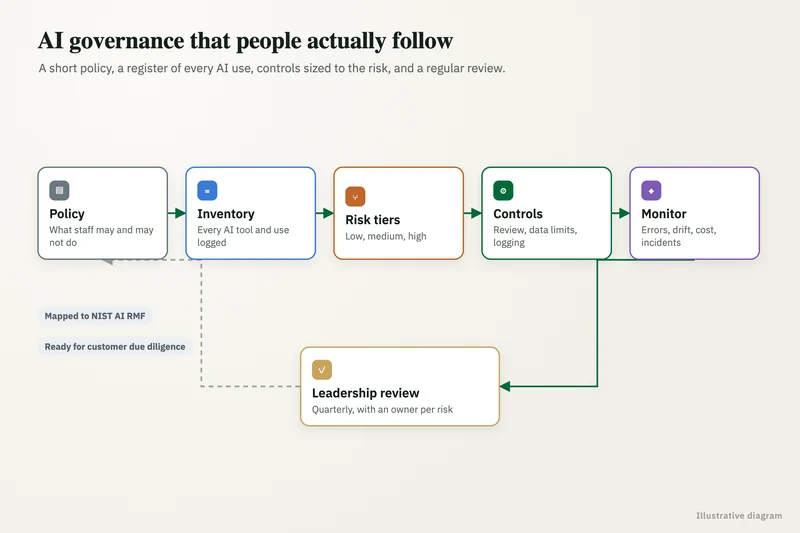
An AI risk assessment is the step where a company decides, use case by use case, whether an AI tool can be used, under what controls and who is accountable. It sits inside AI governance: the policy says what is allowed in general, and the assessment applies that policy to a specific tool doing a specific job.
The pressure to do this properly has grown on three sides. Staff already use AI whether or not it is approved, and IBM's 2025 Cost of a Data Breach report found that a high level of shadow AI added about $670,000 to the average breach cost. Customers, carriers and auditors now send questionnaires asking how AI is controlled. And US and EU rules with fixed dates are arriving, covered in the law section below.
Lepide's June 2026 guide makes a point worth repeating for mid-size firms: for most companies, an AI risk assessment is primarily a data exposure assessment. The first question is what the tool can see and where that data goes. Bias, accuracy and transparency questions come next, and matter most where the AI influences decisions about people.
How do you conduct an AI risk assessment? The 7-step process
The process below follows the four functions of the NIST AI Risk Management Framework (Govern, Map, Measure, Manage), which NIST published as a voluntary framework in January 2023, and scales down to a company of 50 to 1,000 staff. A first pass across all tools usually takes weeks, not months, when one person owns it.
- 1. Name an owner and a risk appetite: one accountable person, plus a short statement of what the business will and will not accept, such as no customer data in tools without a business agreement.
- 2. Build the inventory: every AI tool and AI feature in use, including Copilot in Microsoft 365, AI features switched on inside your CRM or help desk, and personal chatbot accounts found through a staff survey or network logs.
- 3. Map each use case: which team, which task, which data goes in, where the output goes and whether it reaches a customer, an employee decision or money.
- 4. Identify harms: data leakage, wrong output acted on, unfair outcomes for people, IP or contract breaches, security abuse such as prompt injection, and vendor lock-in or outage.
- 5. Score likelihood and impact on a 1 to 5 scale and multiply, using the table in the next section.
- 6. Set controls and decide: approve, approve with conditions, or reject, with the conditions written down (human review, logging, data restrictions, vendor terms).
- 7. Monitor and repeat: review high-risk uses quarterly and every use when the vendor, model, data or task changes.
How should you score AI risks?
Use a simple likelihood times impact score from 1 to 25, then let the score set the level of review. Complex weighted models look rigorous but are rarely applied consistently; a five-point scale that every reviewer understands produces better decisions.
Score impact on the worst realistic outcome, not the average case. A drafting tool that is usually right but occasionally invents a policy clause in a customer email has a high impact score, even if the likelihood is low, because one wrong email can create a contract dispute.
| Score (likelihood x impact) | Risk tier | Typical examples | Minimum controls |
|---|---|---|---|
| 1 to 5 | Low | Summarizing public articles, drafting internal meeting notes | Approved tool list, acceptable use policy, staff training |
| 6 to 11 | Moderate | Drafting customer emails, internal search over company documents | Business-tier contract, no training on your data, a person approves before sending, access limited to the right folders |
| 12 to 19 | High | Extracting invoice data that feeds payments, answering customer questions directly | Confidence thresholds, human review queue, prompt and output logging, error sampling every month |
| 20 to 25 | Critical | AI influencing hiring, lending, insurance, housing or health decisions | Legal review, documented human decision-maker, notice to affected people, bias testing, quarterly reassessment |
What should an AI risk assessment template include?
One page per use case is enough for most mid-size companies, as long as every field is filled in. These are the fields we use; copy them into a spreadsheet or a form in Microsoft Forms or Google Forms so new requests arrive in the same format.
- Use case name, business owner and date of review.
- Tool and vendor, plan tier and whether the contract excludes your data from model training.
- Data in: categories (public, internal, confidential, personal, health, financial) and where they come from.
- Output: who sees it, whether a person checks it, and whether it reaches customers, money or decisions about people.
- Harms identified, each with a likelihood score, an impact score and the product.
- Legal triggers checked: Colorado SB 26-189, HIPAA, EU AI Act, TCPA for calls, sector rules.
- Controls required and who confirms each one is in place.
- Decision (approve, approve with conditions, reject), approver name and next review date.
Worked example: assessing an AI assistant for customer emails
Take a hypothetical US distributor with 180 staff. The customer service team wants an AI assistant inside Zendesk that drafts replies to order-status and returns emails, using order data from NetSuite and the returns policy stored in SharePoint.
Mapping shows the inputs are customer names, email addresses, order numbers and shipping addresses, plus internal policy documents. Outputs go to customers. Harms identified: customer data sent to a vendor that might retain it (likelihood 2, impact 4, score 8); a draft that misstates the returns policy and is sent unchecked (likelihood 3, impact 4, score 12); an order from the wrong customer pulled into a reply (likelihood 2, impact 5, score 10); prompt injection through a customer email telling the assistant to issue a refund (likelihood 2, impact 3, score 6, because the assistant has no refund permission).
The highest score, 12, puts the use case in the high tier. The decision is approve with conditions: the vendor's business terms must confirm no training on customer data; every draft is reviewed by an agent before sending for the first 60 days; the assistant retrieves only from the current returns policy folder and cites the clause it used; order lookups are matched on order number and email address together; prompts and outputs are logged; and a supervisor samples 50 sent replies a month. After 60 days with error rates recorded, the owner can propose letting the simplest order-status replies send automatically, which triggers a reassessment rather than a quiet change.
Note what the example does not need: a bias audit, a legal opinion or a governance platform. Matching effort to risk is the point of the exercise.
Which US and EU rules affect an AI risk assessment?
No single US federal law requires an AI risk assessment for most private companies, but several rules decide which use cases must be treated as high or critical. This is not legal advice; confirm your obligations with counsel.
Colorado SB 26-189, signed May 14, 2026 and effective January 1, 2027, replaced the earlier Colorado AI Act with a narrower notice-based law on automated decision-making in consequential decisions in education, employment, lending, healthcare, housing and insurance. Consumers get an explanation of adverse outcomes, human review and data correction, and the Colorado Attorney General enforces it. Under HIPAA, any AI vendor handling protected health information needs a signed Business Associate Agreement. The FCC ruled on February 8, 2024 that AI-generated voices count as artificial voices under the TCPA, so outbound AI calls need prior express consent.
If your AI systems or their output are used in the EU, the EU AI Act applies. As amended by the 2026 Digital Omnibus, its Article 50 transparency duties (telling people they are dealing with an AI and labeling synthetic media) apply from August 2, 2026, and high-risk obligations for uses such as employment, credit and education move to December 2, 2027.
Which AI risk assessment framework should you use?
For most US mid-size companies, NIST AI RMF is the right base: it is free, voluntary, sector-neutral and widely recognized by customers and auditors. NIST also published a Generative AI Profile, NIST AI 600-1, in July 2024, which lists risks specific to chat and content tools and is a useful prompt list for step four.
Companies that need a certificate to show customers should look at ISO/IEC 42001, the certifiable AI management system standard; our comparison of ISO 42001 and NIST AI RMF covers the trade-off. For assessing effects on people, ISO/IEC 42005, published on May 28, 2025, gives guidance on AI system impact assessments. It is a process standard and is not certifiable. Whichever you choose, the use-case template above is what your teams will actually fill in.
Should you run the AI risk assessment yourself or hire help?
Run it yourself when your AI use is limited to business-tier chat and productivity tools, nobody uses AI in decisions about people, and someone internal has time to own the inventory. The template and scoring table above are enough to start, and our guide to managing shadow AI covers how to find unapproved tools.
Bring in help when any use case scores high or critical, when you handle health, lending, insurance or employee data, when customers or carriers are asking for evidence you cannot produce, or when the assessment needs controls configured, such as logging, access limits and review queues, rather than only written down. The common failure is not a missing framework but a finished spreadsheet with no controls running behind it. Security has a parallel gap: IBM's 2025 report found that 97% of breached organizations that had an AI-related security incident lacked proper AI access controls.
Common AI risk assessment mistakes
Most failed assessments fail for the same few reasons, and all are cheap to avoid.
- Assessing vendors instead of use cases, so a tool approved for marketing drafts quietly starts answering customers.
- Counting only approved tools and missing personal accounts and AI features switched on inside existing software.
- Scoring average outcomes instead of the worst realistic one.
- Writing controls that nobody checks, such as human review with no sampling of what reviewers approve.
- Treating the assessment as a one-off, when vendor terms and model versions change several times a year.
- Blocking everything, which pushes staff back to unapproved tools and raises the very risk you are scoring.
How Greenwolf Tech Labs runs AI risk assessments
We start with a free review, then quote a fixed price for an inventory, a scored assessment of each use case using the template above, and the controls that matter, set up in your own systems: access limits, prompt and output logging, review queues and vendor terms checks. The work maps to NIST AI RMF as part of our AI governance consulting.
You own the inventory, templates and scores, and a person stays in the loop on anything touching money, customers or regulated data. If your AI use is light enough that the template in this guide covers it, we will tell you that instead.
FAQ
Frequently asked questions
What is an AI risk assessment?
An AI risk assessment is a structured review of an AI tool or use case that identifies what could go wrong, who could be harmed, how likely and serious each harm is and which controls are required before use. It ends in a recorded decision: approve, approve with conditions or reject.
How long does an AI risk assessment take?
A single low or moderate risk use case can be assessed in an hour or two with a good template. A first pass across all AI tools in a mid-size company usually takes a few weeks, mostly spent building the inventory. High-risk uses touching hiring, lending or health data take longer because they need legal review and testing.
Is an AI risk assessment legally required in the US?
There is no general federal requirement for most private companies. Some rules make specific uses high risk: Colorado SB 26-189 covers automated consequential decisions from January 1, 2027, HIPAA requires a Business Associate Agreement with AI vendors handling health data, and the EU AI Act applies if your AI is used in the EU. Check with counsel.
What is the difference between an AI risk assessment and an AI impact assessment?
A risk assessment covers all risks to the business and to people, including data leakage, security and vendor risk. An impact assessment focuses on effects on individuals and society, such as unfair outcomes. ISO/IEC 42005, published in May 2025, gives guidance specifically for AI system impact assessments.
Who should own AI risk assessments in a company?
One named person should own the inventory and process, often in operations, IT or compliance, with sign-off from a senior leader for high-risk uses. Business owners of each use case fill in the template, and legal and security review the high and critical tiers.
How often should an AI risk assessment be updated?
Review high and critical uses at least quarterly and every use case whenever the vendor, model, data sources or task change. A yearly review of the whole inventory catches tools that were added or quietly switched on in existing software.
Can I use a free AI risk assessment template?
Yes, and for light AI use a template is enough. Make sure it records data categories, who sees the output, scored harms, legal triggers, required controls and a named approver. A template without a step to confirm controls are running gives a false sense of safety.
Keep reading
Related pages
Get started
Tell us where AI should pay back
Describe the work that eats your team's time and the systems you run. We reply within one business day with the use cases we would test first, the risks to plan for and a fixed-price proposal.
- Free 30-minute AI review
- Fixed quote before any work starts
- Advice that is vendor-neutral, in plain English
Prefer email? info@aiconsultingservicesusa.com
Book a free AI review
Two lines is enough to start.