

Use cases
AI use cases for business, sorted by department and by how fast they pay back
The most useful AI use cases for business are usually the least glamorous: answering leads faster, pulling data out of documents, covering the phones and producing reports without copy and paste. This guide lists practical use cases by department for US small and mid-size companies and shows the scoring method we use to choose which one to do first.
Book a free AI review
Two lines is enough. A specialist replies within one business day.
Quick answer
What are the best AI use cases for business?
The best AI use cases for business are repetitive tasks with messy inputs and clear rules for checking the output: lead qualification and follow-up, support ticket triage, after-hours call answering, extracting data from invoices and forms, internal knowledge search, and automated reporting. Back-office tasks often pay back faster than customer-facing ones.
- Back-office use cases often return more than visible customer-facing projects.
- Score every idea on value, ease and risk before choosing the first.
- A good first use case has high volume, reachable data and easy checking.
- Keep a person approving outputs that touch money, customers or regulated data.
Which AI use cases for business pay back fastest?
Tasks that happen many times a week, take a person several minutes each and have outputs that are easy to check usually pay back fastest. MIT NANDA reported in 2025 that the biggest returns from generative AI came from back-office automation, even though more than half of budgets went to sales and marketing.
In practice that points to document processing, reconciliations, reporting, compliance tracking and internal question answering. These rarely make headlines, but they remove hours from the same people every week, and errors are caught before they reach a customer.
A useful rule of thumb is to look for work that someone describes as copying, checking or chasing. Those three verbs nearly always mark a task where information moves between systems by hand, which is exactly where an AI step plus ordinary automation can take over most of the effort while a person keeps the final say.
What are the best AI use cases for sales and marketing?
In sales, AI is most useful before and after the conversation, not during it. Common use cases include replying to new inquiries within minutes, enriching leads with company size and industry from sources like Clay or Apollo, scoring and routing them in HubSpot or Salesforce, researching an account before a call and drafting follow-up emails from meeting notes for the rep to edit.
In marketing, the practical wins are drafting first versions of product descriptions or campaign copy for a human editor, summarizing customer reviews into themes, repurposing long content into shorter formats and producing short training or explainer videos with tools such as Synthesia or HeyGen.
- Instant reply and qualification for web and email inquiries.
- Lead enrichment and scoring before CRM routing.
- Pre-call account research briefs.
- Follow-up drafts from call notes.
- Review and feedback summaries by theme.
What are the best AI use cases for customer service?
Ticket triage, draft replies and after-hours phone coverage are the three that most often work well. AI can read an incoming Zendesk or Freshdesk ticket, classify it, pull the order or account details and draft a reply grounded in your help center, which an agent approves or edits. For simple, high-volume questions, the reply can go out directly once accuracy is proven.
On the phone, an AI receptionist can answer calls when staff are busy or the office is closed, book appointments, take messages and transfer urgent calls to a person. Rules apply here: the FCC ruled in February 2024 that AI-generated voices count as artificial voices under the TCPA, so outbound AI calls need prior express consent, and some states require telling callers they are speaking with an AI.
What are the best AI use cases for finance and operations?
Document-heavy work is where AI helps finance and operations most. Typical uses are extracting invoice and receipt fields into QuickBooks or NetSuite, matching supplier statements to purchase orders, flagging unusual transactions for review, consolidating spreadsheets from different sources into one report and drafting variance commentary for the monthly close.
Operations teams use AI to turn messy supplier emails into structured orders, find and screen new suppliers against fixed criteria, summarize shift or job reports and answer staff questions from SOPs. In one of our case studies, an insurance brokerage automated the standardization of every insurer's spreadsheet into one dashboard, cutting report time from 4 to 5 hours to under 5 minutes.
What are the best AI use cases for HR and internal teams?
Internal knowledge search is usually the safest starting point here. An assistant that answers employee questions from your handbook, benefits documents and policies, with citations back to the source page in SharePoint or Google Drive, reduces repeat questions to HR and managers without making decisions about people.
Other common uses are drafting job descriptions, scheduling interviews, preparing onboarding checklists and summarizing training material. Be careful with screening or ranking candidates: for companies whose AI output is used in the EU, the EU AI Act's high-risk obligations for employment uses apply from December 2, 2027, and Colorado SB 26-189 adds notice and human review duties for consequential decisions from January 1, 2027. This is not legal advice.
How do you choose the right AI use case to start with?
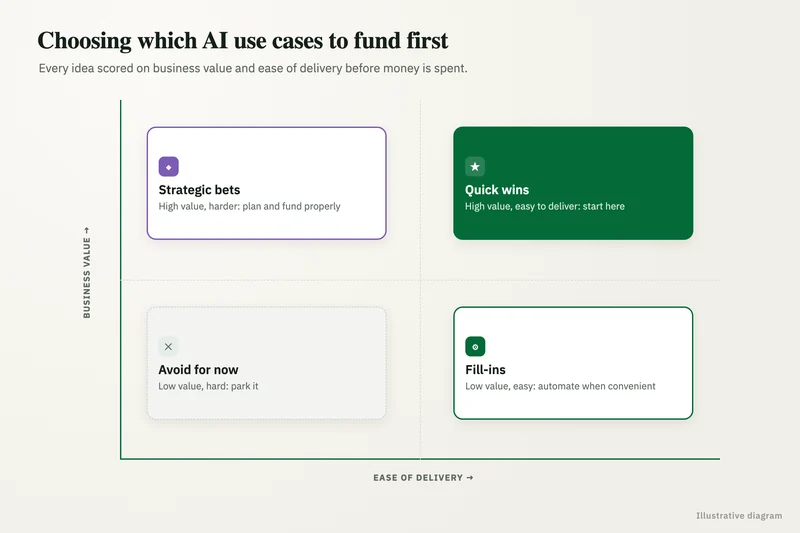
Score every candidate on the same scale and plot the results on a value and ease matrix. Value combines hours saved per month, error cost and any revenue effect, such as faster lead response. Ease combines data access, input consistency, number of systems involved and how simple it is to check the output. Risk is scored separately and can veto an otherwise attractive idea.
The top-right corner (high value, high ease, acceptable risk) holds your first project. High-value, low-ease ideas go on the roadmap with their prerequisites. Low-value ideas are dropped, however often they come up in meetings.
| Criterion | Question to ask | Weight |
|---|---|---|
| Volume | How many times a month does this task happen? | High |
| Time per case | How many minutes does a person spend each time? | High |
| Error cost | What does a mistake cost in money, rework or customer trust? | Medium |
| Data access | Can the inputs be reached through an API, export or shared folder? | High |
| Ease of checking | Can a person verify the output in seconds? | Medium |
| Risk | Does it touch payments, regulated data or decisions about people? | Veto |
Which AI use cases fit specific industries?
Every industry has its own version of the same patterns: documents to read, requests to route and reports to assemble. What changes is the systems and the risk level, so the same use case needs different safeguards in different sectors.
In manufacturing, common uses are summarizing quality nonconformance reports, drafting work instructions and pulling supplier quotes into the ERP for comparison. Logistics companies apply AI to reading bills of lading and proofs of delivery, answering shipment status questions and building route plans. Insurance agencies use it to prepare renewal summaries from policy files, extract data from submissions and draft certificates of insurance for review. Healthcare providers focus on intake, scheduling and prior authorization paperwork, with a signed Business Associate Agreement required for any AI vendor handling protected health information. Ecommerce businesses use it for product catalog copy, return reasons and where-is-my-order tickets. Accounting firms use it to chase client documents in tax season and draft engagement letters.
Our industry pages cover these in more depth, with the systems and controls each sector needs.
Which AI use cases should most businesses avoid at first?
Avoid starting with anything fully autonomous that talks to customers, moves money or makes decisions about people. Also avoid use cases built on data you cannot reach yet, very low-volume tasks and projects whose success nobody can measure.
These are the patterns behind many abandoned pilots. S&P Global Market Intelligence reported that 42% of companies abandoned most of their AI initiatives in 2025, citing cost, data privacy and security. Starting with a contained, measurable task builds the evidence and trust that bigger projects need.
How do you measure whether an AI use case is working?
Measure the same numbers before and after: hours spent per week, cases handled per day, turnaround time, error or rework rate, and running cost per case. Record the baseline before anything is built, because estimates made afterward are almost always too generous.
Track the human-review queue as well. If the share of items sent for review falls over the first weeks while accuracy holds, the use case is maturing. If it stays high, the prompts, data or scope need work before you scale it to more teams.
Finally, revisit the scores every quarter. A use case that ranked low because its data sat in personal drives may move up once files are centralized, and a new feature in a tool you already pay for, such as Microsoft 365 Copilot or Google Workspace, can make a previously hard idea cheap to try. The matrix is a living list, not a one-time exercise.
Case study · Logistics company, UK
Route planning automation
Dispatch typed every address into Google Maps, which optimizes only 25 stops and cannot add time at each stop. A Python tool that loads addresses automatically, adds buffer time per stop and optimizes the full route.
- Manual address entry eliminated
- Delivery estimates customers could rely on

FAQ
Frequently asked questions
What is the most common AI use case in small businesses?
Writing and research with general tools like ChatGPT is the most common informal use. Among planned projects, lead follow-up, customer support, phone answering and document processing are among the most requested workflows in 2026.
How many AI use cases should a company start with?
One, or two at most. A single well-measured project builds the evidence, skills and trust needed for the next ones, while several parallel pilots tend to split attention and stall.
Do AI use cases need clean data?
They need the specific inputs for that task to be reachable and reasonably consistent. You rarely need a full data cleanup first, but the scoring step should flag any use case whose data is scattered or unreliable.
Can AI use cases work with our existing software?
Usually, yes. Most business systems, including HubSpot, Salesforce, NetSuite, QuickBooks, Zendesk, SharePoint and Google Drive, have APIs or exports that AI workflows can read from and write to with the right permissions.
Who should own an AI use case inside the company?
The manager of the team whose work it changes. They define what a correct output is, watch the review queue and decide when the system is ready for more volume, with technical support from IT or an outside partner.
What is an example of AI in business operations?
A common example is invoice processing: AI reads incoming invoices, extracts vendor, amount and line items, matches them to purchase orders and posts them to the accounting system. Anything below a confidence threshold or outside tolerance goes to a person for review before posting.
Keep reading
Related pages
Get started
Tell us where AI should pay back
Describe the work that eats your team's time and the systems you run. We reply within one business day with the use cases we would test first, the risks to plan for and a fixed-price proposal.
- Free 30-minute AI review
- Fixed quote before any work starts
- Advice that is vendor-neutral, in plain English
Prefer email? info@aiconsultingservicesusa.com
Book a free AI review
Two lines is enough to start.