

Generative AI
Generative AI consulting grounded in your own documents and data
Our generative AI consulting helps US companies move from scattered chatbot experiments to a few assistants and content tools that answer from company documents, cite their sources and stay within budget. It is for leaders of firms with roughly 20 to 1,000 staff who want to know which generative AI uses are worth funding and how to run them safely.
Book a free AI review
Two lines is enough. A specialist replies within one business day.
Quick answer
What does a generative AI consultant do?
A generative AI consultant identifies where text, document and content generation can save real time, selects the model and platform, designs retrieval over company documents so answers cite sources, sets up evaluation and human review, and estimates running costs. Generative AI consulting should end with a tested tool or a build-ready specification, not just ideas.
- Most value comes from grounding answers in your documents, with citations.
- Models are chosen by testing OpenAI, Claude and Gemini on your real tasks.
- An eval set of known questions measures accuracy before and after launch.
- Cost caps and logging keep usage visible and spending predictable.
Where does generative AI consulting pay back in a mid-size company?
It pays back where staff spend hours reading, searching, summarizing or drafting from documents the company already has. Internal question-answering over policies and procedures, first drafts of proposals and reports, summarizing long contracts or call notes, and pulling fields out of PDFs are the usual front-runners.
Adoption is already broad. The Federal Reserve reported in an April 2026 note that 41% of US workers said they used generative AI at work as of November 2025. The problem for most companies is not getting people to try it; it is that each person uses a different tool, with different data terms, and nobody can measure what it is worth. Generative AI consulting focuses that activity on a few shared tools with measured results.
- Staff assistant over SharePoint or Google Drive policies, with citations.
- Proposal and report drafting from approved templates and past work.
- Contract, call and ticket summarization for managers.
- Field extraction from invoices, forms and purchase orders.
How do you stop a generative AI tool from making things up?
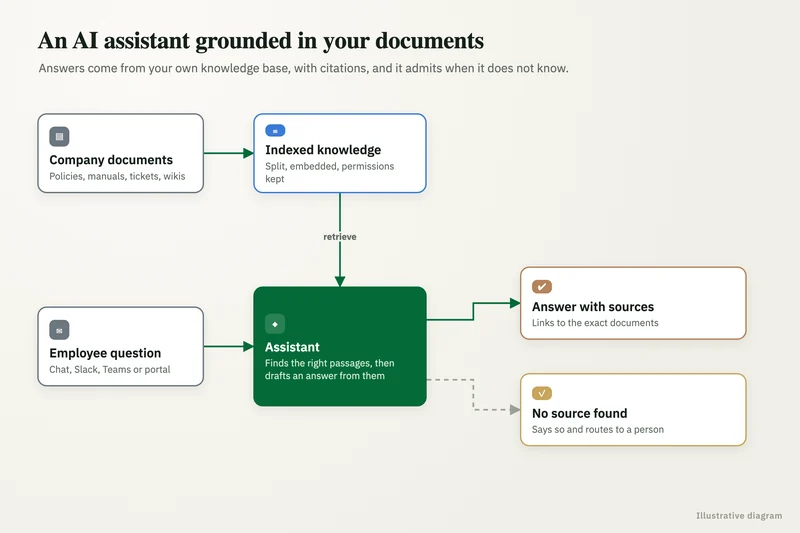
You ground it in your own content and make it show its sources. The pattern is retrieval: the tool searches an index of approved documents, passes the relevant passages to the model, and returns an answer with citations a user can click to verify.
We design the retrieval layer (which documents, how they are split, how permissions carry over from SharePoint or Google Drive), choose a vector store such as Pinecone, Qdrant, Supabase with pgvector or Azure AI Search, and set rules for when the tool should say it does not know. We then test it against an eval set of real questions with agreed answers, so accuracy is a number rather than a feeling.
What you get
What we deliver
Scoped and quoted at a fixed price after a free review.
Use-case shortlist
Generative AI uses ranked by hours saved, data readiness and risk, with a recommended first build.
Model test report
Accuracy, cost per task and data terms for OpenAI, Claude, Gemini or other options on your sample tasks.
Retrieval design
Which documents are indexed, how permissions carry over, and how citations are shown to users.
Eval set
A bank of real questions or tasks with agreed answers, used to measure accuracy before and after launch.
Review and logging rules
Human-review points, confidence thresholds, prompt and output logging, and cost caps per workflow.
Pilot build
A working assistant or content tool for one team, built in your accounts, ready to measure.
Which generative AI platform should we use?
Start with what your staff already work in, then test for the custom pieces. If your company runs on Microsoft 365, Copilot and Copilot Studio may cover the first needs. If you are on Google Workspace, Gemini is the natural first look. For custom assistants, we compare OpenAI, Claude and Gemini directly on your tasks.
Some companies need more control over where data goes. Amazon Bedrock offers models from several providers inside an AWS account, Microsoft Foundry does the same inside Azure, and open-weight models such as Llama, Mistral or Qwen can run in your own cloud. We set out the trade-offs in accuracy, cost per task and data terms, and you make the call.
How do you measure whether generative AI is working?
We measure it against a baseline taken before launch: time per task, error rate and volume. After launch we track the same numbers, plus accuracy on the eval set and how often users accept, edit or reject the output.
Every production tool logs prompts and outputs, with sensitive fields masked where needed. Logs show which questions fail, which documents are missing and where staff stop trusting the answers. That feedback drives monthly improvements, and it also gives leadership a clear answer when they ask what the tool is returning for the money.
What does generative AI cost to run?
Running cost is mostly model usage, retrieval hosting and any per-seat licenses, and it varies with volume and model choice. We estimate cost per task during testing and set a monthly cap per workflow so a spike in usage triggers an alert before it becomes a surprise invoice.
Our own consulting and build work is quoted at a fixed price after a free review. For a market view of consultant rates, see our AI consultant cost guide. You hold the accounts with each vendor, so usage bills come to you directly with no markup.
What generative AI risks need a human in the loop?
Anything that reaches a customer, moves money or touches regulated data needs a person to approve it first. That includes outbound emails drafted by AI, claims or billing decisions, and any output based on health or financial records.
We build those checks into the workflow rather than relying on a policy alone. Drafts land in a review queue, confidence thresholds route uncertain answers to a named owner, and synthetic images or video are labeled. Where the EU AI Act's transparency rules apply from August 2, 2026, users should be told they are dealing with an AI and synthetic media should be marked. Our case studies show the same principle in other work: a therapy services provider's AppSheet portal used validation and approvals to stop errors at source.
Case study · Logistics company, UK
Route planning automation
Dispatch typed every address into Google Maps, which optimizes only 25 stops and cannot add time at each stop. A Python tool that loads addresses automatically, adds buffer time per stop and optimizes the full route.
- Manual address entry eliminated
- Delivery estimates customers could rely on

How it works
How an engagement runs
- 01
Free review
A call to hear which teams are experimenting and which documents and systems matter most.
- 02
Select and test
We shortlist use cases and test candidate models on your real documents.
- 03
Design
We design retrieval, review queues and logging, and write the eval set with your team.
- 04
Pilot
We build the first tool in your accounts and run it with a small group of users.
- 05
Measure and expand
We compare results with the baseline and agree whether to expand, adjust or stop.
FAQ
Frequently asked questions
Can generative AI answer questions from our SharePoint or Google Drive files?
Yes. A retrieval layer indexes approved files, respects folder permissions where configured, and returns answers with citations to the source document. Accuracy depends on how current and well organized the files are, which we check first.
Is OpenAI, Claude or Gemini best for business use?
There is no single winner. Each performs differently on different document types and tasks, and data terms vary by plan. We test the shortlisted models on your own samples and recommend based on accuracy, cost and terms.
Will our data be used to train the AI model?
On business and API tiers, the major vendors generally offer terms that exclude your data from training, but settings and plans differ. We check the terms for each tool and record them before any company data is used.
How long does a generative AI pilot take?
A focused pilot for one team usually takes a matter of weeks once documents and access are ready. The timeline is fixed in the scope after a free review.
Do we need Microsoft Copilot or a custom tool?
If your work lives in Microsoft 365 and the need is general drafting and summarizing, Copilot may be enough. A custom tool makes sense when answers must come from specific document sets, follow strict rules or connect to systems like Salesforce or NetSuite.
Who owns the prompts and the tool you build?
You do. Accounts are opened in your name, prompts and code live in your repositories, and the documentation is handed over so your team or another vendor can maintain it.
Keep reading
Related pages
Get started
Tell us where AI should pay back
Describe the work that eats your team's time and the systems you run. We reply within one business day with the use cases we would test first, the risks to plan for and a fixed-price proposal.
- Free 30-minute AI review
- Fixed quote before any work starts
- Advice that is vendor-neutral, in plain English
Prefer email? info@aiconsultingservicesusa.com
Book a free AI review
Two lines is enough to start.