

Automation
AI automation consulting that tells you what to automate, in what order, and what it will cost to run
AI automation consulting from Greenwolf Tech Labs turns a long list of manual tasks into a ranked plan: which processes to automate first, where an AI step belongs inside them, which tool should run them and what each will cost per month. It is for US operations and finance leaders whose teams still copy data between spreadsheets, inboxes and systems by hand.
Book a free AI review
Two lines is enough. A specialist replies within one business day.
Quick answer
What does AI automation consulting include?
AI automation consulting includes an inventory of manual processes, an estimate of hours and errors each one causes, a ranked automation backlog, a decision on where AI is needed versus simple rules, a tool recommendation such as n8n, Make, Zapier, Apps Script or Python, and a running-cost model for each workflow.
- Rank processes by hours lost and error cost, not by how impressive the AI sounds.
- Most workflows need rules for most steps and a model for only one or two.
- Tool choice depends on volume, data sensitivity and who maintains the flow afterward.
- Every automation gets a named owner, an error alert and a manual fallback.
What does AI automation consulting include?
It starts with an inventory. We interview the people who do the work and list every recurring task that involves copying, checking, chasing or reformatting information, with how often it happens, how long it takes and what goes wrong. Spreadsheet consolidation, invoice entry, status reporting, lead routing, reminder emails and report packs come up in almost every company we review.
Each task then gets a short design note: the trigger (a new email, a form submission, a file landing in Google Drive, a date), the systems involved, the steps a rule can handle, the step that needs a model and the point where a person checks the result. That backlog becomes the plan your team, or ours, builds from.
- Process inventory with frequency, minutes per run and error history.
- A ranked backlog with estimated hours saved per month.
- Design notes naming triggers, systems, AI steps and review points.
- Tool and hosting recommendation with running costs.
How do you decide which processes to automate first?
We multiply frequency by time per run to get hours per month, add a weight for error cost, then subtract for complexity and data risk. The processes with high hours, frequent errors and clean, reachable data go first, because they pay back fastest and build confidence for the harder ones.
A common surprise is that the most valuable automation is rarely the most visible. MIT NANDA reported in 2025 that the biggest returns from generative AI came from back-office automation, even though more than half of budgets went to sales and marketing. In practice that means reconciliations, compliance tracking and reporting often beat a customer-facing assistant on payback.
What you get
What we deliver
Scoped and quoted at a fixed price after a free review.
Process inventory
Every recurring manual task we find, with frequency, time per run, systems used and known errors.
Ranked backlog
Processes ordered by estimated hours saved, error cost and ease, with the first three recommended.
Workflow designs
Trigger, steps, AI points, confidence thresholds and review queue for each top-ranked process.
Tool recommendation
Which of n8n, Make, Zapier, Apps Script or Python fits each workflow, and where it should be hosted.
Running-cost model
Platform, model and review-time cost per run and per month for each recommended workflow.
Operating rules
Owners, error alerts, logging, retry rules and manual fallback steps for every live automation.
Where does AI belong inside an automated workflow?
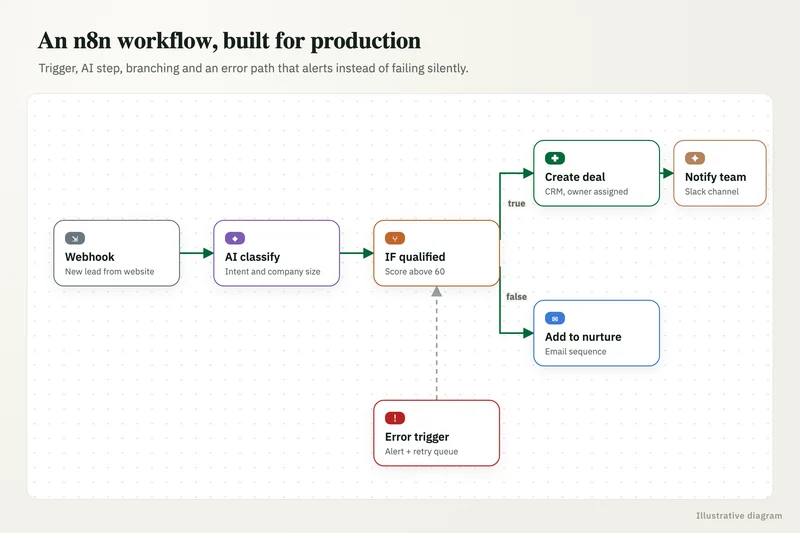
AI belongs only at the steps that deal with messy input or need judgment: reading an unstructured email, extracting fields from a PDF, classifying a request, summarizing a long thread or drafting a reply. Moving the data, applying business rules, checking totals and writing to the CRM are better handled by ordinary logic that behaves the same way every time.
Every AI step gets a confidence threshold. Above it, the workflow continues; below it, the item goes to a human-review queue in Slack, Teams or a simple AppSheet screen. Prompts and outputs are logged so you can see why a record was routed where it was, and a cost cap per run stops a loop from running up a model bill overnight.
n8n, Make, Zapier or custom code: which should you use?
Each fits a different situation. Zapier is quick to set up and connects to almost everything, which suits low-volume flows owned by a business user. Make handles branching and data transformation well at moderate volume. n8n can be self-hosted, which matters when data must stay in your own cloud, and it has AI agent nodes for steps that need a model to decide. Google Apps Script is often the simplest answer when the whole process lives in Google Workspace, and Python is right for heavy data work or logic that outgrows a visual tool.
We recommend based on four things: monthly run volume, data sensitivity, the skills of whoever will maintain the flow and the systems it must reach. Mixing tools is fine if each workflow has one clear home and one owner.
What results can automation consulting lead to?
Results depend on the process, but reporting and tracking work tends to show the clearest gains. In one of our case studies, a regulatory consulting firm replaced manual status tracking with a compliance tool that generates recurring tasks, assigns owners, sends due-date reminders and builds client-wise dashboards. Status reports that took 4 to 5 hours now take under 15 minutes, and the firm saves 30+ hours a month.
We set a baseline before anything is built (hours, error rate, turnaround time) so the gain is measured rather than estimated after the fact.
What does an automated workflow cost to run each month?
Running cost has three parts: the workflow platform plan, model usage for any AI steps and the time someone spends checking the review queue and fixing failures. For most mid-volume business workflows, the platform and model costs are modest compared with the staff hours saved, but they scale with volume, so we model them per run and per month before you commit.
Our AI automation consulting also covers the unglamorous parts that keep costs predictable: error alerts that reach a named person, retry rules, a log of every run and a written manual fallback for when a connected system is down. For third-party consultant rates, see our AI consultant cost guide.
Case study · Regulatory consulting firm
Compliance management tool
Recurring filings for many clients were tracked in spreadsheets, email and memory, with frequent missed steps. A compliance tool with recurring task generation, owners, due-date reminders and client-wise dashboards.
- Status reports in under 15 minutes instead of 4-5 hours
- 30+ hours a month saved on coordination

How it works
How an engagement runs
- 01
Free review
A short call to hear which tasks eat the most time and which systems hold the data.
- 02
Process interviews
We sit with the people doing the work and record each task as it really runs.
- 03
Scoring and design
We rank the backlog, design the top workflows and price the build at a fixed fee.
- 04
Build or handover
We build the first workflows, or hand the designs to your team with review support.
- 05
Measure
We compare hours and error rates against the baseline and adjust the backlog.
FAQ
Frequently asked questions
What is the difference between automation and AI automation?
Automation follows fixed rules, such as moving a form submission into a CRM. AI automation adds a model for steps rules cannot handle, like reading a free-text email or extracting fields from a scanned document. Most good workflows combine both.
Do we need clean data before automating with AI?
You need data that is reachable and consistent enough for the task, not a perfect warehouse. We check the specific fields each workflow depends on and fix only those, which is usually far less work than a full cleanup.
Can you automate processes in QuickBooks, NetSuite or HubSpot?
Yes. All three have APIs that workflow tools can use. We usually start by reading data and drafting changes for approval, then allow direct writes once the workflow has proven accurate.
How long does an automation consulting engagement take?
The inventory and ranked backlog typically take two to four weeks. Building the first workflows usually adds a few weeks more, depending on how many systems each one touches.
Will automation replace members of our team?
In most of our projects it removes copying and chasing, not roles. People move to reviewing exceptions and handling the cases that need judgment, which is also where errors are caught.
Who owns the workflows after they are built?
You do. Workflows, credentials and logs run in accounts in your name, with documentation so your team can change or move them later.
Keep reading
Related pages
Get started
Tell us where AI should pay back
Describe the work that eats your team's time and the systems you run. We reply within one business day with the use cases we would test first, the risks to plan for and a fixed-price proposal.
- Free 30-minute AI review
- Fixed quote before any work starts
- Advice that is vendor-neutral, in plain English
Prefer email? info@aiconsultingservicesusa.com
Book a free AI review
Two lines is enough to start.