

Governance guide
How to manage shadow AI in a mid-size company: find it, triage it, replace it
How to manage shadow AI comes down to four moves: find out which AI tools people already use, sort them by risk, give staff an approved option that is as good as the one they found themselves, and keep checking. Bans on their own push use further out of sight. This guide is for owners, COOs, finance leads and IT managers at US companies of roughly 50 to 1,000 staff who do not have a dedicated security team, and it ends with a 90-day plan you can run with the tools you already pay for.
Book a free AI review
Two lines is enough. A specialist replies within one business day.
Executive summary
How do you manage shadow AI?
To manage shadow AI, run a no-blame survey and check admin logs to find which AI tools staff use, triage each one as allowed, approved with conditions, replaced or blocked, provide a paid, approved AI tool with data protections, publish short rules on what data may go where, and review usage every quarter.
What to take away
- Shadow AI is usually a sign of unmet demand, not bad intent.
- You can find most of it with admin consoles, expense data and a short survey.
- Approved tools that are as easy as consumer apps do more than bans.
- Connected apps and browser extensions carry more risk than chat windows.
What is shadow AI, and is it already in your company?
Shadow AI is any AI tool used for work without the company's approval or knowledge: a personal ChatGPT, Claude or Gemini account, a free meeting-note bot that joins calls, a browser extension that rewrites emails, or an AI feature switched on inside a SaaS app nobody reviewed. It is the AI version of shadow IT, with one important difference: people paste information into it, so the risk travels with the content, not just the software.
It is almost certainly already in your company. A TrustedTech survey run by Censuswide among 2,001 employees in the US and UK in March 2026 found that 48% use unapproved AI tools at work, and the rate among senior decision-makers was 65%, against 31% for staff below that level. That last point matters for how you respond: if the leadership team is part of the pattern, a policy announced from the top without a better option will not stick.
The useful way to read those numbers is as demand. People use AI tools they found themselves because the tools save them time. Managing shadow AI well keeps that time saving and removes the uncontrolled risk.
What are the real shadow AI risks?
The risks are concrete and mostly about data, not science fiction. Ranked by how often they cause real trouble in mid-size companies, they look like this.
- Data leaving your control: customer lists, contracts, pricing, payroll or financial statements pasted into consumer accounts whose terms may allow the provider to keep or train on them.
- Connected apps: tools granted access to email, calendars, Google Drive, SharePoint or a CRM can read far more than anyone pastes. A BlackFog survey of 2,000 respondents, reported by Channel Insider, found that 51% of employees had connected or integrated AI tools with other work systems without IT approval.
- Regulated data: health information processed under HIPAA needs a signed Business Associate Agreement, and major model vendors offer one only on certain API or enterprise tiers, not on consumer plans.
- Wrong answers reaching customers: unreviewed AI drafts in quotes, contracts or support replies that state things that are not true.
- Lost knowledge and access: prompts, outputs and workflows sitting in personal accounts that leave when the employee does.
- Decisions about people: AI used informally to screen candidates, score customers or set prices can fall under employment, lending and insurance rules, including Colorado's SB 26-189 from January 1, 2027. This is not legal advice; check with counsel if this applies to you.
How do you detect shadow AI without a security team?
You can find most shadow AI in a week using sources you already have. Dedicated discovery tools exist and suit larger firms, but a mid-size company can get an accurate first picture from five places, without monitoring what anyone types.
Start with the survey, and say clearly that it is an amnesty: the goal is to learn what is useful and make it safe, not to discipline anyone. People will tell you far more than any log shows, including which tasks they use AI for, which is exactly what you need to choose an approved replacement.
- A short anonymous survey: which AI tools do you use, for which tasks, and what data goes in?
- Third-party app grants: the Google Workspace admin console and Microsoft Entra ID both list apps that users have allowed to access their accounts. Look for AI note-takers, writing assistants and email tools.
- Expense reports and company card statements: search for AI subscriptions bought individually.
- Browser extensions: if you manage browsers centrally, export the list of installed extensions and look for AI writing, summarizing and recording tools.
- Meeting invites: unknown bots joining calls are an easy tell, and most meeting platforms let admins restrict them.
How should you triage the AI tools you find?
Put every tool you find into one of four buckets, based on the data it touches and the access it has, not on how popular it is. Make the decision once, write it down and publish the list, so staff do not have to guess. The table below shows the decision logic most mid-size companies end up with.
| What you find | Typical risk | Decision | What to do |
|---|---|---|---|
| Personal chat accounts used for drafting and research with no sensitive data | Low to medium | Replace | Move users to the approved business plan and close personal use for work |
| Personal chat accounts used with customer, financial or employee data | High | Replace now | Provide the approved tool within days; explain which data may go where |
| AI features inside software you already pay for (CRM, help desk, office suite) | Usually low | Allow with conditions | Check the vendor's data terms and admin settings, then switch on deliberately |
| Meeting bots and note-takers joining calls | Medium to high | Approve one, block the rest | Pick one tool with admin controls and consent prompts; restrict others |
| Browser extensions and apps with access to email or files | High | Block unless reviewed | Revoke unreviewed grants; offer an approved alternative for the same task |
| AI used to screen people, score customers or set prices | High, legal | Pause and review | Bring under formal governance with human review and records |
How to manage shadow AI in 90 days: a step-by-step plan
This plan assumes one owner (often the COO, IT manager or a fractional Chief AI Officer), a few hours a week from them and short input from department heads. It is deliberately small. The aim at day 90 is not perfect control; it is a known list of tools, an approved option most people prefer and a habit of checking.
Days 1 to 30, find and stabilize: run the amnesty survey, pull app grants, expense data and extension lists, and build a single inventory with the tool, owner, task, data involved and access granted. Revoke the riskiest connected apps immediately, starting with anything that can read all email or all files. Tell staff in plain language which data must not go into any unapproved tool while the review runs.
Days 31 to 60, decide and provide: triage each tool with the table above, choose the approved general assistant for the company (for many firms this is Microsoft 365 Copilot, a ChatGPT business plan, a Claude business plan or Gemini in Google Workspace, depending on the office suite and data needs), confirm its data terms and admin settings, and roll it out to the teams with the heaviest shadow use first. Publish a one-page list of approved, conditional and blocked tools. Run a short, practical training session on what good use looks like for each department.
Days 61 to 90, embed and measure: add an easy request route for new tools with a target response time of days, not months, add AI tools to employee onboarding and offboarding checklists, and repeat the app-grant and expense checks. Compare the inventory with day 30. Then set a quarterly review so the list stays current as vendors add AI features to software you already use.
Why banning AI tools backfires, and what works instead
Blanket bans tend to move AI use onto personal phones and home laptops, where you have no visibility at all. They also send a message that the company does not want people to work faster, which is rarely what leadership means. The TrustedTech finding that senior decision-makers use unapproved tools at twice the rate of their teams shows how quickly a ban becomes a rule nobody follows.
What works is making the approved path the easiest one. That means a paid business plan with single sign-on so staff do not need personal accounts, clear examples of permitted use for each team, quick answers to requests for new tools, and named people who can help. The cost of business seats is usually small next to the cost of one contract, price list or customer file ending up in the wrong place, and the seats come with admin controls, retention settings and data terms that consumer plans lack.
Keep monitoring proportionate. Checking which apps have access to company accounts is reasonable. Reading what individual employees type into approved tools is usually not, and it pushes use back into the shadows.
What should a shadow AI policy cover?
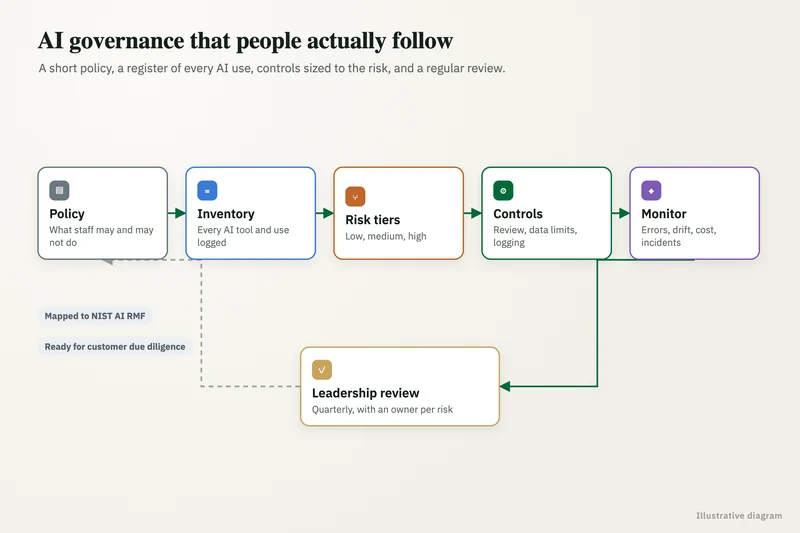
A shadow AI policy does not need to be a separate document. Most companies fold it into a short AI acceptable use policy and add four practical pieces: the published list of approved, conditional and blocked tools; a data rule that says which categories of information may go into which tools; a request route for new tools with an owner and a response target; and a statement that AI use found during the review will not be punished if it is disclosed.
Our AI acceptable use policy guide includes clauses you can adapt and a department-by-department view of the data rules. If you want a recognized structure behind it, the NIST AI Risk Management Framework is voluntary and organizes the work into four functions, Govern, Map, Measure and Manage, which map well onto the inventory, triage and review cycle described here.
How do you know your shadow AI program is working?
Track a few numbers every quarter rather than trying to prove that shadow AI has disappeared, because it never fully will. The direction of travel is what matters.
- Share of staff active on the approved AI tool, by department.
- Number of unreviewed third-party AI apps with access to company accounts.
- Individually expensed AI subscriptions per month.
- Requests for new tools, and the median days to a decision.
- Share of respondents in the repeat survey who say the approved tool covers their needs.
When should you get outside help with shadow AI?
Most mid-size companies can run the first 30 days themselves. Outside help pays off when there is no one with the time to own the program, when the inventory shows AI already touching regulated data or decisions about people, when you need to choose between Copilot, ChatGPT, Claude and Gemini for the whole company, or when leadership wants a governance framework it can show to customers, auditors or a board.
Our AI governance consulting work starts with a free review and turns into a fixed-price plan: the inventory, the triage decisions, the approved-tool choice and settings, the policy and the training, with you owning every document and account. Where we find a recurring task people were using shadow AI for, we can also scope a proper, reviewed workflow for it, with a person staying in the loop on anything that touches money, customers or regulated data.
Case study · Logistics company, UK
Route planning automation
Dispatch typed every address into Google Maps, which optimizes only 25 stops and cannot add time at each stop. A Python tool that loads addresses automatically, adds buffer time per stop and optimizes the full route.
- Manual address entry eliminated
- Delivery estimates customers could rely on
FAQ
Frequently asked questions
What is an example of shadow AI?
A sales manager pasting a customer contract into a personal chatbot account to summarize it is a common example. Others include a free note-taking bot joining client calls, or a browser extension with access to company email. Each happens without the company reviewing where the data goes.
Is shadow AI the same as shadow IT?
Shadow AI is a type of shadow IT, but the risk is different. Shadow IT is mainly about unapproved software and accounts. With shadow AI, people actively paste information into the tool, and connected AI apps can read email and files, so the data exposure is usually larger.
Should we ban ChatGPT at work?
A ban without an alternative usually moves use to personal devices where you cannot see it. A better approach is to provide an approved business plan with admin controls and clear data rules, then block or replace only the tools that fail your review.
How do I find out which AI tools employees are using?
Combine an anonymous, no-blame survey with the third-party app lists in the Google Workspace admin console or Microsoft Entra ID, company card and expense data, and your managed browser extension list. Together these give a reliable first inventory within a week.
Can we monitor what employees type into AI tools?
Monitoring which tools have access to company accounts is common and proportionate. Reading individual prompts raises employee-relations and privacy questions, varies by state and tends to drive use underground. Check with counsel before any content-level monitoring; this is not legal advice.
Who should own shadow AI in a mid-size company?
One named person, usually the COO, the IT manager or a fractional Chief AI Officer, with input from department heads and legal or compliance where needed. Shared ownership across several people tends to mean nobody runs the quarterly review.
Keep reading
Related pages
Get started
Tell us where AI should pay back
Describe the work that eats your team's time and the systems you run. We reply within one business day with the use cases we would test first, the risks to plan for and a fixed-price proposal.
- Free 30-minute AI review
- Fixed quote before any work starts
- Advice that is vendor-neutral, in plain English
Prefer email? info@aiconsultingservicesusa.com
Book a free AI review
Two lines is enough to start.