

Buyer's guide
Copilot vs ChatGPT Enterprise: which AI assistant should your company buy?
Copilot vs ChatGPT Enterprise comes down to where your work lives: Microsoft Copilot is the better default if your company runs on Outlook, Teams and SharePoint, while ChatGPT is usually stronger as a standalone workspace for research, writing and analysis across a mixed stack. This guide is for US owners and operations leaders at companies of roughly 20 to 1,000 staff who need to choose, price and govern a company-wide AI assistant without overbuying seats.
Book a free AI review
Two lines is enough. A specialist replies within one business day.
Executive summary
Should we buy Microsoft Copilot or ChatGPT Enterprise?
Buy Microsoft Copilot if most of your work and files already live in Microsoft 365, because it answers from your mail, meetings and SharePoint under existing permissions. Choose ChatGPT if your stack is mixed or your heaviest users need a flexible research and drafting tool. Many companies pilot both on a small group before licensing everyone.
What to take away
- Copilot fits Microsoft 365 shops; ChatGPT fits mixed stacks and heavy research and drafting work.
- Firms under 300 seats can buy Copilot Business or ChatGPT Business instead of enterprise tiers.
- Licensing a targeted group of heavy users often costs a third of a company-wide rollout.
- Fix file permissions and write a data policy before any assistant can see company content.
Copilot vs ChatGPT Enterprise: what is the real difference?
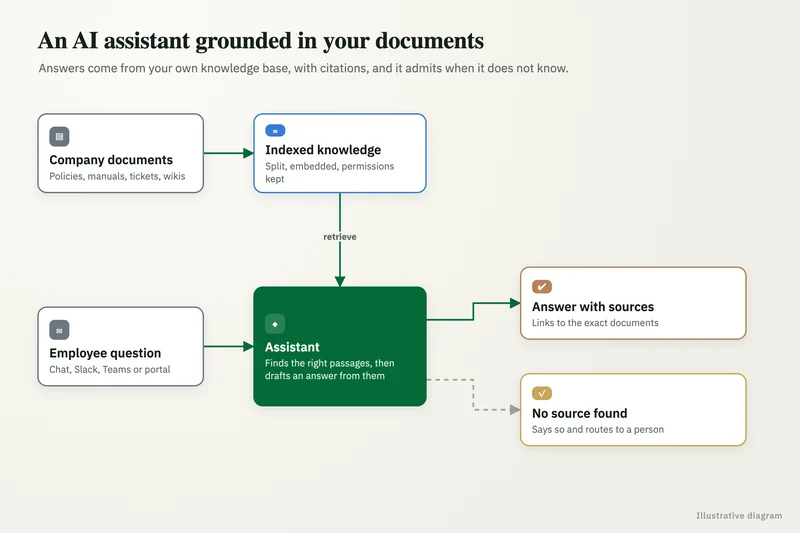
The real difference is where each tool gets its context. Microsoft Copilot sits inside Word, Excel, PowerPoint, Outlook and Teams and can answer from the email, files, chats and meeting transcripts a user already has access to in your Microsoft 365 tenant. ChatGPT is a separate workspace: people bring work to it, either by uploading files or through connectors to sources such as SharePoint, Google Drive or other systems, and it pulls that content into its own environment for the answer.
That one difference drives most of the decision. If the job is summarizing a Teams meeting, drafting a reply from a long Outlook thread or building a deck from a SharePoint folder, Copilot has the context already and saves the copy-paste step. If the job is researching a market, rewriting a proposal, analyzing an exported spreadsheet or working across tools Microsoft does not touch, ChatGPT tends to be the more flexible tool. EPC Group's 2026 comparison frames the same split as a question of where your data lives rather than which model is smarter, and that is the most useful way to think about it.
A naming note, because it confuses buyers: Microsoft Learn's licensing page, updated in September 2026, says the Microsoft 365 Copilot app is now called Microsoft Copilot. On the OpenAI side, ChatGPT Business is the plan formerly called ChatGPT Team, and ChatGPT Enterprise is the larger, sales-negotiated tier.
How much do Copilot and ChatGPT cost per user in 2026?
Both vendors now sell a small-business tier that most companies under 300 people should compare first, before looking at enterprise plans. The figures below are list prices from the sources named in the table, checked in October 2026; they are not our prices, and vendors change them often, so confirm on the vendor's page before you sign.
Two points matter more than the headline number. First, Copilot is an add-on: you still pay for the Microsoft 365 plan underneath it, so a company already on Business Standard pays only the add-on, while a company on Google Workspace would be buying a second productivity suite. Second, Microsoft also includes a web-grounded Copilot Chat at no extra cost with eligible Microsoft 365 subscriptions, according to Microsoft Learn, so staff who only need general drafting help may not need a paid seat at all.
| Plan | List price per user | Who it is for | Source |
|---|---|---|---|
| Microsoft 365 Copilot Business (add-on) | $21/month paid yearly (shown at $18 on offer in Oct 2026); $25.20 billed monthly | 1 to 300 users on a Microsoft 365 Business plan | Microsoft pricing page, Oct 2026 |
| Microsoft 365 Business Standard with Copilot | $23.50/month paid yearly | Up to 300 users, includes the base suite | Microsoft pricing page, Oct 2026 |
| Microsoft 365 Business Premium with Copilot | $32.00/month paid yearly | Up to 300 users, adds advanced security | Microsoft pricing page, Oct 2026 |
| Microsoft 365 Copilot (enterprise add-on) | $30/month | Larger firms on E3 or E5 | Office Watch, Mar 2026 |
| Microsoft 365 E7 (suite with Copilot included) | $99/month | Enterprises buying E5, Copilot and Agent 365 together | Office Watch, Mar 2026 |
| ChatGPT Business | $20/month billed annually; $25 billed monthly; 2-seat minimum | Small and mid-size teams | eesel, Jul 2026 |
| ChatGPT Enterprise | Quote only, annual billing; EPC Group cites about $60 | Firms needing SCIM, data residency, compliance logs | eesel, Jul 2026; EPC Group, 2026 |
| Copilot Chat (web-grounded) | Included | Anyone with an eligible Microsoft 365 plan | Microsoft Learn, Sep 2026 |
What would a 120-person company actually pay?
Here is a worked example using the list prices above. Take a 120-person professional services firm already on Microsoft 365 Business Standard, with about 35 people who write, analyze or sit in meetings for most of the day and 85 who use AI occasionally. These are seat costs only, before taxes, partner discounts, training time or any permissions cleanup.
The pattern holds at most sizes: the biggest saving comes from deciding who needs a paid seat, not from choosing the cheaper vendor. The price gap between Copilot Business and ChatGPT Business is about $1 a seat per month at list, which is noise next to the difference between licensing 35 people and 120. A firm above 300 staff loses access to Copilot Business, so the same logic applies at the $30 enterprise rate: 450 seats cost $162,000 a year, while 100 targeted seats cost $36,000.
| Option | Seats | Annual seat cost at list | Notes |
|---|---|---|---|
| Copilot Business for everyone | 120 | $30,240 ($25,920 at the $18 offer) | Everyone gets Copilot in Outlook, Teams and Office apps |
| ChatGPT Business for everyone | 120 | $28,800 | Staff still have free Copilot Chat in Microsoft 365 |
| Copilot Business for heavy users only | 35 | $8,820 | Other 85 use the included Copilot Chat |
| ChatGPT Business for heavy users only | 35 | $8,400 | Other 85 use the included Copilot Chat |
| Both tools for heavy users | 35 + 35 | $17,220 | Common when one team lives in meetings and another in research |
Which is safer for company data: Copilot or ChatGPT?
Both vendors commit that business content is not used to train their models, and both offer single sign-on and admin controls; the bigger risk is usually inside your own permissions. Microsoft Learn's enterprise data protection page (updated August 2026) says Copilot prompts, responses and the data it reads through Microsoft Graph are not used to train foundation models, and that Copilot inherits your permissions, sensitivity labels, retention policies and audit settings. That cuts both ways: Copilot answers from anything a user can already open, so if a salary spreadsheet or board folder is shared with the whole company by mistake, Copilot can surface it in a summary. Cleaning up SharePoint and OneDrive sharing before rollout is the single most important Copilot task, and it is often the part that takes longest.
ChatGPT has the opposite risk profile. Nothing reaches it unless a user uploads it or an admin connects a source, so the exposure comes from what people paste in and which connectors you switch on. According to eesel's July 2026 review of OpenAI's plans, ChatGPT Business includes SSO, an admin console and a no-training commitment, while Enterprise adds SCIM user provisioning, encryption key management, data residency options, role-based access and a compliance logs API.
Regulated work needs one more check. Under HIPAA, any AI vendor handling protected health information needs a signed Business Associate Agreement, and major vendors sign them only on certain enterprise or API tiers, not on consumer or entry plans. Microsoft states that Copilot supports HIPAA compliance for properly configured implementations but that web search queries are not covered by its BAA; Anthropic lists a HIPAA-ready offering on Claude Enterprise. If your teams will use an assistant to help screen job applicants or make lending, housing or insurance decisions, Colorado's SB 26-189 adds notice and human-review duties for consequential decisions from January 1, 2027. This is not legal advice; confirm both with counsel.
- Audit who can open what in SharePoint, OneDrive and Teams before switching on Copilot.
- List which data classes may go into any assistant: public, internal, confidential, regulated.
- Decide which ChatGPT connectors are allowed and who can approve new ones.
- Set retention periods for chats and confirm what the vendor logs and for how long.
- Confirm BAA availability on the exact tier you buy if health data is involved.
Where does each tool win in day-to-day work?
In pilots, the winner usually depends on the task more than the vendor. Use the list below to match tools to the work your heaviest users actually do each week, then test those exact tasks rather than generic prompts.
- Meeting recaps and action items from Teams calls: Copilot, because the transcript is already in the tenant.
- Replying to long email threads and finding what was agreed: Copilot in Outlook.
- Building a first-draft deck or document from existing SharePoint files: Copilot.
- Market research, competitor summaries and long-form writing: ChatGPT is usually preferred by heavy users.
- Analyzing an exported CSV, cleaning data or writing formulas and scripts: ChatGPT is usually more flexible.
- Teams that work in Google Workspace, Slack or Notion: ChatGPT, or Gemini if you are a Google shop.
- Building simple internal agents on Microsoft data: Copilot Studio, which Office Watch reports is included with Copilot Business.
- Custom assistants for a repeated task such as a proposal checker: either tool's custom assistant feature works.
Should you consider Claude or Gemini instead?
Yes, at least as a comparison, because they change the math for some companies. Google Workspace's pricing page shows Gemini in Gmail on Business Starter and Gemini across Gmail, Docs, Meet and more on Business Standard, so a company already on Google Workspace may get much of what it needs without buying Copilot or ChatGPT at all.
Anthropic's Claude is the other common shortlist entry, especially for long documents, writing and analysis. Its pricing page lists Claude Team standard seats at $20 a month billed annually or $25 monthly, premium seats at $100 annually or $125 monthly, and Claude Enterprise at $20 a seat per month plus usage at API rates, with a 20-seat minimum and annual billing. Enterprise adds SCIM, audit logs, a compliance API, custom retention and a HIPAA-ready offering.
The approach we recommend is to pick one primary assistant for everyone and allow a second tool only for a named team with a clear reason. Three overlapping subscriptions, each half-adopted, is the most common and most expensive outcome.
How do you run a 30-day pilot before you buy?
A short, measured pilot answers the Copilot vs ChatGPT Enterprise question for your company better than any comparison article, including this one. The point is to compare both tools on your own tasks, with a baseline, before committing to annual seats that auto-renew.
Keep the pilot small and specific. Pick 10 to 20 people across two or three roles, give half of them each tool (or both to a few), and choose five recurring tasks per role that take real time today, such as weekly client status emails, meeting notes, proposal first drafts or month-end variance commentary.
Measure three things: minutes per task before and after, how often the output needed heavy rework, and whether people still use the tool in week four, when the novelty has gone. Adoption is broad but uneven; the Federal Reserve reported in April 2026 that 41% of workers said they used generative AI at work, so expect some pilot users to be far ahead of others and design training for the rest.
- Week 1: clean up file sharing, set the data policy, give licenses and a one-hour task-based training.
- Week 2: users run their five tasks in the tool and log time and rework.
- Week 3: swap or add a tool for a subset to compare like for like.
- Week 4: review usage reports, collect examples of good and bad outputs, and decide seat counts by role.
What mistakes should you avoid, and when should you buy neither?
The most common mistake is licensing everyone on day one. Usage is rarely even across a company, so read the admin usage reports from your pilot before setting seat counts; occasional users may be well served by the included Copilot Chat. Other mistakes are skipping the permissions audit, buying without a written policy on what data may go in, and treating a chat assistant as automation.
That last point decides when to buy neither. An assistant helps a person do a task faster; it does not move data between systems on its own or run a process overnight. If the real goal is to process invoices, answer the phone, qualify leads or update your CRM, a workflow built for that process will usually pay back faster than more seats, and the assistant decision can wait. Our guide to AI use cases for business ranks which processes tend to pay back first.
You may also want to wait if your files are badly organized, if no one owns the rollout or if leadership has not agreed what success looks like. Fix those first; the tool choice is the easy part.
How we help companies make this decision
Choosing an assistant is part of our generative AI consulting work. After a free review of your systems, roles and data, we recommend a primary tool and seat plan, run the permissions and policy work, design a 30-day pilot with real baselines and train staff on their own tasks. The recommendation follows your stack and your pilot numbers, and we will tell you which options we considered and rejected.
Every engagement is scoped after the review and delivered at a fixed price, and you keep ownership of every account, prompt and document. If the right answer is a workflow instead of more licenses, we will say so. Email info@aiconsultingservicesusa.com or book a free review to get a written recommendation for your company.
Case study · Therapy services provider
Clinician portal on AppSheet
Clinicians logged sessions in shared spreadsheets, so billing fixed formats, durations and missing authorizations before every cycle. A guided portal with validation, auto-calculated durations, approvals and automatic sync to billing.
- Data entry down from 10-15 minutes a day to under 3
- Errors stopped at the source

FAQ
Frequently asked questions
Is Copilot better than ChatGPT for business?
Copilot is better when your work lives in Microsoft 365, because it can use your email, Teams meetings and SharePoint files without uploads. ChatGPT is often better for research, long-form writing and data analysis, and for companies on a mixed stack. Test both on your own tasks before deciding.
How much does ChatGPT Enterprise cost per user?
OpenAI does not publish ChatGPT Enterprise pricing; it is quote-only with annual billing, according to eesel's July 2026 review. EPC Group's 2026 comparison cites about $60 per user per month. Most companies under 300 staff can compare ChatGPT Business first, listed at $20 per user per month billed annually.
Can a small business buy Microsoft Copilot?
Yes. Microsoft 365 Copilot Business is sold to organizations with 1 to 300 users as an add-on to a Microsoft 365 Business plan. Microsoft's pricing page listed it at $21 per user per month paid yearly in October 2026, with an offer price of $18.
Do Copilot and ChatGPT train on our company data?
No, on their business tiers. Microsoft Learn states that Copilot prompts, responses and Microsoft Graph data are not used to train foundation models, and ChatGPT Business and Enterprise include a no-training commitment. Consumer and personal accounts have different terms, which is why companies should block personal accounts for work data. Always read the terms for the exact plan you buy.
Can we use both Copilot and ChatGPT?
Yes, and many companies do, usually with Copilot for Microsoft-centered work and ChatGPT for a smaller group doing research or analysis. Keep it deliberate: name which teams get which tool and why, and apply one data policy to both.
Is Microsoft Copilot Chat free?
The web-grounded Copilot Chat is included at no extra cost with eligible Microsoft 365 subscriptions, according to Microsoft Learn. Work-grounded chat, which answers from your mail and files, requires a paid Microsoft Copilot license.
Is ChatGPT Enterprise HIPAA compliant?
HIPAA requires a signed Business Associate Agreement with any vendor handling protected health information, and major AI vendors sign these only on certain enterprise or API tiers. Confirm BAA availability with the vendor for your exact plan before any patient data goes in. This is not legal advice.
Keep reading
Related pages
Get started
Tell us where AI should pay back
Describe the work that eats your team's time and the systems you run. We reply within one business day with the use cases we would test first, the risks to plan for and a fixed-price proposal.
- Free 30-minute AI review
- Fixed quote before any work starts
- Advice that is vendor-neutral, in plain English
Prefer email? info@aiconsultingservicesusa.com
Book a free AI review
Two lines is enough to start.