

Industry guide
AI consulting for professional services firms: where it pays and how to start
AI consulting for professional services firms helps consultancies, engineering and architecture practices, agencies and IT service firms decide where AI should cut non-billable work, how to protect client confidentiality and what to change in pricing before time savings eat into revenue. This guide is for owners and managing partners of firms with roughly 20 to 500 people who want a plan they can defend to partners and clients.
Book a free AI review
Two lines is enough. A specialist replies within one business day.
Executive summary
What does AI consulting for professional services firms involve?
AI consulting for professional services firms means picking the few workflows where AI saves real hours, usually proposals, research, first drafts and reporting, then setting confidentiality rules, choosing tools and adjusting pricing so saved time becomes margin rather than lost billings. A good engagement ends with a ranked roadmap, a policy and one pilot running on real client work.
What to take away
- Start with non-billable work such as proposals and status reports, where saved hours are pure gain.
- On hourly billing, AI time savings cut revenue unless pricing changes for that deliverable.
- Client engagement letters and vendor data terms decide which AI tools are allowed on which matters.
- Thomson Reuters found only 18% of professionals say their organisation tracks AI return on investment.
Why do professional services firms need a different AI plan?
Because a firm that sells time and expertise gets paid differently from a manufacturer or a retailer. When a plant automates a step, the saved cost drops straight to margin. When a consultancy or engineering practice automates a step on hourly work, the client may simply be billed fewer hours. The same efficiency can raise profit or shrink revenue depending on how the work is priced, and generic AI advice rarely accounts for that.
Three other traits make professional services different. The real asset is accumulated knowledge: past proposals, reports, models, drawings and lessons that sit in SharePoint, Google Drive or a project server and are rarely reused well. Client confidentiality is contractual, not just good manners, so the question is not only whether a tool is secure but whether the engagement letter allows it. And quality is personal: a partner, project engineer or account lead signs off on the work, so any AI step needs a clear point where a qualified person reviews the output.
Client pressure is also real. The Thomson Reuters Institute 2026 AI in Professional Services Report found that two-thirds of corporate respondents want their outside firms to use AI, but fewer than 20% mandate it. Clients expect the efficiency without yet writing it into contracts, which gives firms a window to decide on their own terms how AI shows up in scope, quality and price.
Which AI use cases pay off first, by type of firm?
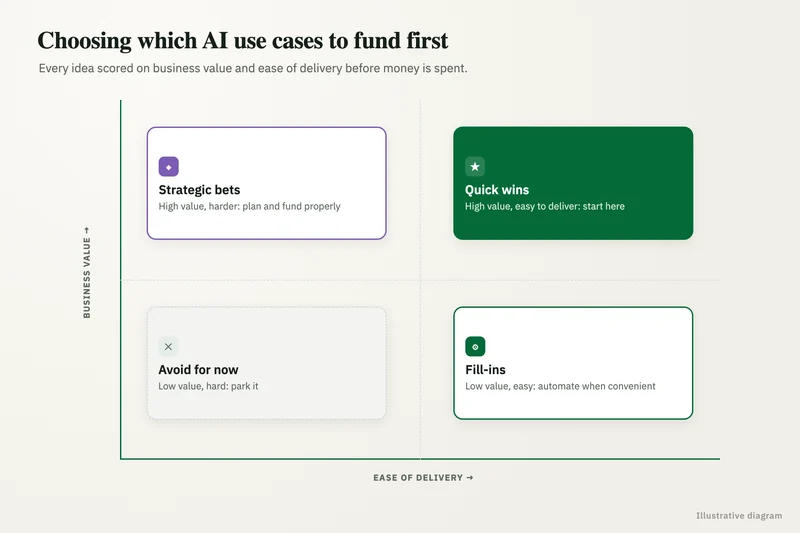
The best first use cases sit in work the firm repeats often, does not bill for, or bills at a fixed fee. Proposals, research summaries, status reporting and internal knowledge search fit all three tests in most firms. Client-facing judgment, such as the recommendation in a strategy report or a stamped engineering calculation, should stay with people, with AI limited to drafting and checking.
The table below shows where we usually start for each firm type, the systems involved and the main risk to manage. For law firms and accounting practices, which have their own ethics rules and software, see our dedicated pages linked at the end of this guide.
| Firm type | First use cases | Systems usually involved | Main risk to manage |
|---|---|---|---|
| Management and strategy consultancies | Proposal and SOW drafting from past wins, interview notes to findings, desk research summaries with citations | SharePoint or Google Drive, HubSpot or Salesforce, Microsoft 365 Copilot or ChatGPT Enterprise | Client data pasted into unapproved tools |
| Engineering and architecture firms | RFP and spec review, statement of qualifications assembly, search across past project documents, submittal and RFI logs | Deltek Vantagepoint or Ajera, Autodesk Construction Cloud, Bluebeam, project file servers | AI errors reaching sealed or stamped work |
| Marketing and creative agencies | Brief to first draft, monthly report commentary, asset tagging, pitch research | Asana or monday.com, Google Workspace, ad and analytics platforms | Client IP, disclosure of AI-generated content |
| IT services firms and MSPs | Ticket triage and summaries, documentation upkeep, quarterly business review prep | ConnectWise, Autotask, IT Glue, Jira | Credentials and client system details in prompts |
| Regulatory and compliance advisory | Obligation tracking, recurring task generation, client status reports | Compliance calendars, spreadsheets, client portals | Missed deadlines if automation fails silently |
What does AI do to billable hours and pricing?
It depends on the billing model, which is why pricing belongs in the AI plan from day one. Here is a worked example with simple numbers. The $200 blended hourly rate is an assumption for illustration, not a market benchmark.
A 40-person engineering firm writes eight proposals a month, each taking about 10 hours of senior time. Proposals are not billable, so cutting each to 6 hours with AI drafting from past submissions frees 32 senior hours a month for billable work or business development. That gain costs the firm nothing in revenue, which is why proposals are so often the right first project.
Now take a recurring technical report billed hourly. It takes 20 hours, so the client pays $4,000. If AI-assisted drafting and checking bring it to 14 hours, the bill falls to $2,800 and the firm loses $1,200 of revenue on the same deliverable. Priced as a fixed fee of $4,000, the same 6 saved hours become margin instead. Under a retainer, they become capacity to serve more clients with the same team.
The practical rule: automate non-billable work first, and before automating billable work, decide whether that deliverable moves to a fixed fee, a value-based price or a revised scope. A fixed fee for a well-defined deliverable also gives the client a predictable cost, which is an easier conversation than explaining why an hourly bill changed.
How do you protect client confidentiality when using AI?
Treat it as a contract question first and a technology question second. Many engagement letters, master service agreements and NDAs limit where client data can be stored and who can process it, and an AI vendor may count as a subprocessor. Before any tool touches client material, check what your agreements allow and what each vendor's business terms say about retention and training.
The checklist below is what we review with firms during an engagement. It is operational guidance, not legal advice; your counsel should confirm how your specific client contracts apply.
- Engagement letters and MSAs: do any restrict cloud storage, offshore processing or third-party tools? Note the clients that need consent first.
- Vendor plan, not vendor name: business and enterprise tiers of Microsoft, OpenAI, Anthropic and Google usually carry different data terms from personal accounts. Approve plans, not brands.
- Retention and training settings: confirm prompts and files are not used for model training and are kept only as long as your policy allows.
- Matter-level access: an assistant that searches past work must respect the same folder permissions as your document system, so a junior on one client cannot retrieve another client's files.
- Logging: keep prompt and output logs for client-facing work, so you can show what the tool did if a client asks.
- Disclosure: decide when you tell clients AI was used, and write it into proposals or engagement letters rather than leaving it to each team.
What should an AI consulting engagement for a firm deliver?
A useful engagement produces decisions and one working proof, not a slide deck of possibilities. At the end, partners should know which three to five use cases come first, what each is expected to save, which tools are approved for which data, and how pricing will change where AI touches billable work.
In our AI strategy consulting work for professional services firms, the outputs are an inventory of AI tools staff already use, including personal accounts leadership may not know about,a ranked use-case list scored on hours saved, risk and effort, an acceptable-use policy tied to client confidentiality, a measurement plan, and a fixed-price pilot on the top use case. If a firm wants us to build the pilot as well, we can, and the firm keeps ownership of the accounts, prompts, code and data.
Measurement matters more in this sector than most. The same Thomson Reuters report found only 18% of professionals say their organisation tracks return on investment from AI, and 40% do not know whether it is measured at all. Firms that track hours saved per deliverable, turnaround time and write-offs can show partners and clients what changed; firms that do not are left arguing from anecdotes.
What does a 90-day AI plan look like for a professional services firm?
Ninety days is enough to go from scattered experiments to one measured pilot and a firm-wide policy. The sequence below assumes a firm of 20 to 500 people with one partner or director who owns the work and can make decisions within a day or two.
- Days 1 to 15: interview practice leads, survey staff on tools already in use, collect sample proposals, reports and engagement letters, and record current hours for the top candidate workflows.
- Days 16 to 30: score candidate use cases on hours saved, client risk and effort, choose the first pilot, and publish an interim one-page AI policy so staff know what is allowed now.
- Days 31 to 60: build and test the pilot on real work with a reviewer signing off every output, track hours and corrections, and fix the prompts, retrieval or templates that cause errors.
- Days 61 to 75: decide pricing for any billable deliverable the pilot touches, update proposal and engagement letter language on AI use, and train the teams who will use it.
- Days 76 to 90: review the measured results with partners, confirm the next two use cases on the roadmap, and set a monthly check on usage, cost and quality.
What mistakes do firms make with AI, and when should they not hire a consultant?
The most common mistake is buying licences before choosing workflows. A firm rolls out Copilot or ChatGPT Enterprise to everyone, usage spikes for a month and then fades, because nobody redesigned the proposal process or the report template around the tool. Other frequent mistakes are automating billable work without changing its price, letting each team pick its own tools with no data rules, training partners last when they are the ones who approve output, and measuring nothing, so success cannot be shown.
Our case studies include a compliance management tool built for a regulatory consulting firm, with recurring task generation, named owners, due-date reminders and client-wise dashboards. Status reports that took 4-5 hours now take under 15 minutes, saving more than 30 hours a month. The lesson for other firms is that the biggest early wins are often in the operational work around client delivery, not the expert work itself.
You may not need a consultant at all if your firm has fewer than about 20 people, a single practice area and a partner willing to spend a few hours a week on it. In that case, an approved business plan of one AI tool, a one-page policy and a shared library of proven prompts may be enough. Outside help earns its fee when there are several practices with different client terms, a document archive worth turning into searchable knowledge, or pricing decisions that partners need evidence to make.
How do you choose an AI consulting partner for a professional services firm?
Look for a partner who asks about your billing model and client contracts in the first meeting, not just your software. Those two questions show they understand how a firm that sells expertise actually makes money.
Then ask for specifics. Which of your workflows would they start with, and why? How will they measure hours saved per deliverable? Who owns the prompts, code and accounts afterwards? Will the pilot run on real client work with a named reviewer? Is the first phase a fixed price with a clear exit point? A partner that can answer these plainly, and that will tell you when a smaller step such as a readiness assessment is enough, is more useful than one with a longer list of logos. For a broader checklist see our guide to choosing AI consulting firms, and for typical market rates see our AI consultant cost guide.
Case study · Insurance brokerage, Australia
Automation and dashboarding
Policy data arrived as spreadsheets from several insurers, each in a different structure, and every client report took hours of manual cleanup. An automated pipeline that standardizes every insurer's file and feeds a single reporting dashboard.
- Report time cut from 4-5 hours to under 5 minutes
- Reporting accuracy up from about 75% to 99%

FAQ
Frequently asked questions
How are consulting firms using AI?
Most consulting firms start with proposal and SOW drafting from past wins, summarising interviews and research, and searching their own archive of past work. Client recommendations stay with consultants, with AI used for first drafts and checks. Firms that get the most value also redesign the workflow and pricing around the tool rather than just buying licences.
Will AI reduce billable hours at my firm?
It can on hourly work, because the same deliverable takes fewer hours to produce. The fix is to automate non-billable work first and move AI-assisted deliverables to fixed fees, value-based pricing or a revised scope, so saved time becomes margin or capacity instead of lost revenue.
Do clients want their professional services firms to use AI?
Many do. The Thomson Reuters Institute 2026 AI in Professional Services Report found two-thirds of corporate respondents want their outside firms to use AI, though fewer than 20% mandate it. Clients also expect confidentiality to be protected, so firms should explain how AI is used and governed.
Is it safe to put client documents into ChatGPT, Copilot or Claude?
Only on approved business or enterprise plans whose data terms your firm has checked, and only where your engagement letters allow it. Personal accounts should be off limits for client material. Folder permissions, retention settings and logging should be set before any client documents are used.
What is the best first AI project for an engineering or architecture firm?
Proposal and statement of qualifications assembly is usually the best start, because it is frequent, non-billable and draws on past project descriptions and resumes the firm already has. Searching past project documents and reviewing RFPs or specs for key requirements are strong second choices. Sealed or stamped work should keep full professional review.
How much does AI consulting cost for a professional services firm?
It depends on the number of practices, systems and use cases in scope. We quote a fixed price per phase after a free review, so you know the cost of the first step before committing. Our AI consultant cost guide collects published third-party rates by type of firm.
Keep reading
Related pages
Get started
Tell us where AI should pay back
Describe the work that eats your team's time and the systems you run. We reply within one business day with the use cases we would test first, the risks to plan for and a fixed-price proposal.
- Free 30-minute AI review
- Fixed quote before any work starts
- Advice that is vendor-neutral, in plain English
Prefer email? info@aiconsultingservicesusa.com
Book a free AI review
Two lines is enough to start.