

Decision guide
Build vs buy AI: how to decide for each use case
The build vs buy AI decision should be made one use case at a time: buy when an existing product already does the job and the process is not what sets you apart, and build when your own rules, data or workflow are the advantage. For most US companies of 20 to 1,000 staff the answer is a mix, plus a middle path most guides skip: buy the model and the platform, then configure or build the workflow on top. This guide gives a three-path comparison, a scorecard you can run in an afternoon and a worked example.
Book a free AI review
Two lines is enough. A specialist replies within one business day.
Executive summary
Should a company build or buy AI?
Buy AI when a packaged product covers at least most of the workflow, the process is not a competitive advantage and you need results within weeks. Build when your rules, data or workflow are unique, off-the-shelf tools miss key steps and you can own the system after launch. Most mid-size companies buy the model and platform and build only the workflow layer.
What to take away
- Decide build vs buy separately for each use case, never once for the whole company.
- The real choice has three paths: buy a product, configure a platform, or build a custom workflow.
- Almost nobody should train their own model; building usually means building on a bought model.
- Score each use case on differentiation, fit gap, data, integration, ownership and time.
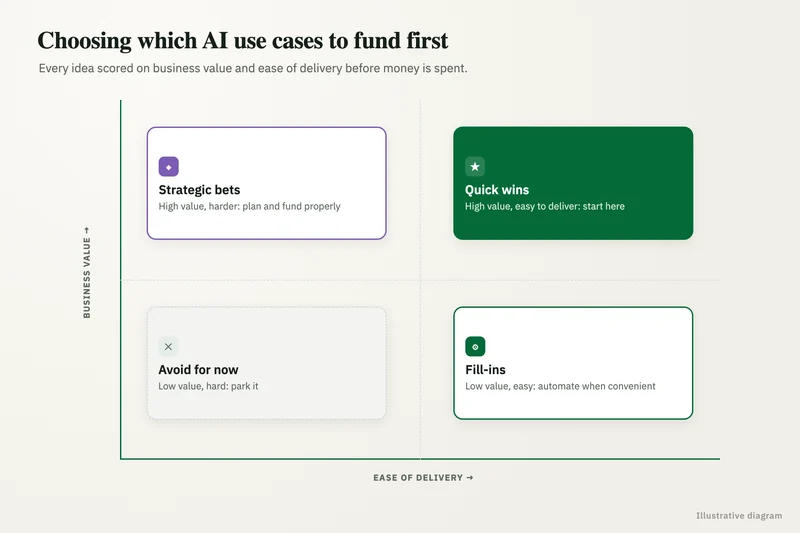
What does build vs buy AI actually mean in 2026?
Build vs buy AI is no longer a choice between writing your own model and licensing someone else's. Training a model from scratch is out of reach and unnecessary for almost every company outside the AI industry. The practical question is how much of the system around the model you own: the prompts, the retrieval over your documents, the business rules, the integrations and the review steps.
That gives three real paths. Buying means paying for a finished product with AI inside it, such as Microsoft 365 Copilot, ChatGPT Enterprise, Gemini in Google Workspace, or the AI features in tools you already use like HubSpot, Salesforce, Zendesk or NetSuite. Configuring means taking a platform such as Copilot Studio, Zapier Agents, Make or n8n and assembling a workflow from its parts with your own instructions and data. Building means a custom workflow or agent, usually written in Python or with LangChain or LangGraph, that calls a bought model from OpenAI, Anthropic, Google or Amazon Bedrock and connects to your systems exactly as your process requires.
The market has moved firmly toward buying. Menlo Ventures' 2025 State of Generative AI in the Enterprise report, based on a survey of about 495 US enterprise decision-makers in November 2025, found that 76% of AI use cases were purchased rather than built internally, up from 53% in 2024. That shift is a useful default, not a rule: the 24% still being built are usually the processes that make a company different.
Buy, configure or build: side-by-side comparison
The table compares the three paths on the factors that usually decide the outcome for a small or mid-size company. Treat it as a typical pattern; individual products and projects vary.
| Factor | Buy a product | Configure a platform | Build a custom workflow |
|---|---|---|---|
| Examples | Microsoft 365 Copilot, ChatGPT Enterprise, AI features in HubSpot or Zendesk, a packaged AI receptionist | Copilot Studio agents, n8n or Make workflows, Zapier Agents with your own prompts and data | Python or LangGraph agent calling OpenAI, Claude, Gemini or Bedrock, connected to your CRM, ERP and document stores |
| Time to first use | Days to weeks | Weeks | Usually one to several months for a first use case |
| Fit to your process | You adapt to the product | Good for standard steps, limited by the platform's connectors and logic | Matches your rules, exceptions and approval steps |
| Upfront cost shape | Low: licenses per seat or per use | Moderate: design and setup work plus platform plan | Highest: design, build, testing and rollout |
| Running cost shape | Predictable per seat; rises with headcount | Platform plan plus model usage | Model usage, hosting and maintenance time |
| Who owns the logic | The vendor | Shared: your workflow on their platform | You, if the contract and accounts say so |
| Main risk | Paying for seats nobody uses; vendor changes pricing or terms | Hitting platform limits once the process gets complex | Building something a product already does; no internal owner after launch |
| Best for | Common tasks done the same way everywhere | Standard workflows that need your data and a few rules | Processes that set you apart or that no product handles |
When should you buy AI?
Buy when the task is done roughly the same way in every company. Drafting and summarizing email, meeting notes, first drafts of documents and searching your own files are well served by business tiers of Microsoft 365 Copilot, ChatGPT, Claude or Gemini. Building your own version of these is almost always a poor use of money, because the vendors improve their products faster than a single company can.
Buying is also the right call when speed matters more than perfect fit, when you have nobody to own a custom system after launch, and when the AI feature lives inside a system you already pay for. If your CRM or help desk vendor has added AI that handles 80% of what you want, test it on real work before paying anyone to build the other 20%.
- The process is generic: writing, summarizing, searching, transcribing, translating.
- A product already in your stack offers the feature on a business tier with clear data terms.
- You need results this quarter and can accept the product's way of working.
- Nobody internal could maintain a custom workflow when an API or prompt needs updating.
When should you build AI?
Build when the way you do the work is the advantage. Pricing rules, screening criteria, underwriting logic, scheduling constraints and the judgment encoded in years of your own records are things no vendor sells, because they are yours. A packaged tool will flatten them into a generic version, and your competitors can buy the same generic version.
Building also wins when the workflow spans several systems a product cannot reach, when your data cannot leave your own cloud accounts, or when a product would need so many workarounds that staff end up doing the hard part by hand anyway. One of our case studies is a sourcing and supplier quality consultancy where the value sat in the client's own screening rules: two custom tools that find candidate suppliers and apply those rules automatically produced an 85% time saving and a 91% cost saving on supplier scouting. No off-the-shelf product held those rules.
- Your rules or data are a competitive advantage you do not want flattened into a vendor's template.
- The workflow crosses systems no single product connects, such as NetSuite, SharePoint and a carrier portal.
- Products tested on real cases miss steps that matter, and staff fill the gaps by hand.
- You have, or will pay for, an owner who can maintain prompts, evaluations and integrations.
Is there a middle option between building and buying AI?
Yes, and it is where most mid-size companies end up. The middle option is to buy the expensive, fast-moving parts (the model, the vector database, the workflow platform) and build only the thin layer that is specific to you: the instructions, the retrieval over your documents, the business rules, the confidence thresholds and the human-review queue. This keeps upfront cost close to a configuration project while giving you most of the fit of a custom build.
Two design choices make the middle path safer. First, keep the model swappable, so the same workflow can call OpenAI, Claude, Gemini or an open-weight model through Bedrock if prices or quality change. Second, keep everything in your own accounts, so the workflow, prompts and logs belong to you rather than to the consultant or the platform reseller.
How to decide: a build vs buy AI scorecard
Score each candidate use case from 1 to 5 on the six factors below, where 1 points toward buying and 5 points toward building. Multiply each score by its weight and add them up. A total under 2.0 means buy a product, 2.0 up to 3.5 means configure a platform, and 3.5 or more means a custom build on a bought model. The weights are our starting point; change them if, for example, data control matters more in your industry.
- Differentiation, 25%: does doing this better than competitors win you customers or margin?
- Fit gap, 20%: when you test the best available product on 20 real cases, how much does it miss?
- Data control, 15%: does the data involve customers, health, finance or employees, or must it stay in your cloud?
- Integration depth, 15%: how many systems must the AI read from or write to?
- Ownership capacity, 15%: can someone internal, or a contracted partner, maintain it for years?
- Time tolerance, 10%: can the business wait months for a better fit, or does it need something this quarter?
Worked example: a 200-person distributor scores three use cases
Take a hypothetical US distributor with 200 staff that runs NetSuite, Zendesk and Microsoft 365. Leadership has three AI ideas and one budget. The scores below are illustrative, to show how the method separates the ideas, not data from a real client.
Drafting and summarizing for office staff scores 1 on differentiation, fit gap, integration, ownership and time, and 2 on data control. The weighted total is 1.15, so the answer is buy: roll out a business tier of Copilot or ChatGPT with a usage policy and training. Support ticket triage scores 2 on differentiation, fit gap and ownership and 3 on data, integration and time, for a total of 2.4, so the answer is configure: test Zendesk's own AI features first and add a workflow in n8n or Make only for the routing rules it cannot handle.
Quote drafting is different. The company's pricing rules, customer-specific discounts and substitution logic are what win orders, so it scores 4 on differentiation, 5 on fit gap, 4 on integration and 3 on data, ownership and time. The total is 3.8, so the answer is build: a custom workflow that reads the request, pulls items and prices from NetSuite, applies the rules and drafts a quote for a salesperson to approve. One company, one budget, three different answers. That is the normal outcome, and it is why a single company-wide build or buy policy usually wastes money in one direction or the other.
| Use case | Diff. 25% | Fit gap 20% | Data 15% | Integration 15% | Ownership 15% | Time 10% | Weighted total | Decision |
|---|---|---|---|---|---|---|---|---|
| Drafting and summaries | 1 | 1 | 2 | 1 | 1 | 1 | 1.15 | Buy |
| Support ticket triage | 2 | 2 | 3 | 3 | 2 | 3 | 2.40 | Configure |
| Quote drafting from NetSuite | 4 | 5 | 3 | 4 | 3 | 3 | 3.80 | Build |
What does each path really cost over time?
Compare total cost over two or three years, not the first invoice. A bought product looks cheap until it is licensed to every seat and only some staff use it. A custom build looks expensive until you compare its running cost, which is mostly model usage billed per task, with years of per-seat licenses. Ask for every option to be modeled on the same volumes.
Market rates for consulting and build work vary widely by type of firm; our AI consultant cost guide collects published third-party figures with sources. Whatever the rates, these are the line items to put side by side for each path:
- Licenses: per seat or per user per month, and whether every seat is needed or only one team.
- Model usage: per task or per thousand tasks, from OpenAI, Anthropic, Google or Bedrock.
- Platform plans: n8n, Make, Zapier, Copilot Studio, a vector database such as Pinecone or Qdrant.
- Design, build and testing: a fixed fee per phase is easier to compare than an hourly estimate.
- Staff time: people reviewing flagged items, updating prompts and handling exceptions.
- Switching cost: what it would take to move to another vendor or model in two years.
Which contract terms protect you either way?
Lock-in is the hidden cost on both sides. A product can raise prices or change data terms, and a custom build can leave you dependent on the firm that wrote it. MIT NANDA reported in 2025 that AI projects bought from or built with specialist partners succeeded about 67% of the time, against about 33% for internal builds, so outside help often improves the odds. The terms below make sure that help does not turn into dependency.
- Your company holds the accounts for every model vendor and platform, and pays them directly.
- You own the code, prompts, workflows, evaluation sets and logs, in writing.
- Vendor tiers used do not train on your data, and a BAA is signed where health data is involved.
- The model can be swapped without a rebuild, and the contract says how.
- A fixed price per phase, a written definition of a change and an exit after any phase.
- Named human-review points on anything touching money, customers or regulated data.
Common build vs buy AI mistakes
Most failed decisions come from deciding at the wrong level or on the wrong evidence. These are the patterns we see most often.
- Setting one policy for the whole company, such as 'we only buy', instead of scoring each use case.
- Building a generic assistant that a business tier of Copilot, ChatGPT or Gemini already provides.
- Buying on a demo instead of testing the product on 20 of your own real cases.
- Treating 'build' as training a model, and pricing it as a research project.
- Starting a custom build with no named internal owner for after launch.
- Ignoring running costs and seat counts until the first annual renewal.
When should you neither build nor buy?
Hold off when the process itself is broken, undocumented or done differently by each person. AI applied to an inconsistent process mostly makes the inconsistency faster. Write the process down, agree on the rules, collect a few weeks of clean examples, and then score it.
Also wait when the volume is too low to matter. A task done ten times a month rarely justifies a custom build and may not even justify extra licenses. Finally, if a use case touches consequential decisions about people, such as hiring, lending or insurance, settle the governance questions before choosing a tool; our AI governance consulting page covers what that involves.
How we help with the build vs buy AI decision
Greenwolf Tech Labs advises and builds, so we are open about the risk that a builder recommends building. We handle it by selling the decision as its own fixed-price phase. After a free review, we score your candidate use cases with you, test the strongest products on your real cases, model running costs on your volumes and hand over a written recommendation for each use case: buy, configure, build or wait. You can take that plan to any provider.
If the answer for a use case is build, we can deliver it at a fixed price, in your accounts, with a person reviewing anything that touches money, customers or regulated data. If the answer is buy, we will tell you which product and which tier, and we will not invent a project you do not need.
Case study · Sourcing and supplier quality consultancy
Supplier scouting automation
Analysts found and filtered suppliers by hand on Google for every client brief. Two tools that find candidate suppliers and apply the client's screening rules automatically.
- 85% time saving
- 91% cost saving

FAQ
Frequently asked questions
Is it cheaper to build or buy AI?
Buying is usually cheaper to start, because you pay licenses instead of design and build work. Over two or three years a custom workflow can cost less when a product would need many seats or many workarounds, since its running cost is mostly model usage per task. Compare both on the same volumes before deciding.
Do most companies build or buy AI?
Most now buy. Menlo Ventures' 2025 survey of US enterprise decision-makers found 76% of AI use cases were purchased rather than built internally, up from 53% in 2024. Companies still tend to build the processes that set them apart.
Should a small business build its own AI?
Rarely from scratch. A small business usually gets more from business tiers of Copilot, ChatGPT, Claude or Gemini plus one or two configured workflows in a tool like n8n, Make or Zapier. A custom build makes sense only for a process that clearly wins customers and that no product handles.
What does building AI mean if we are not training a model?
It means building the system around a bought model: the instructions, retrieval over your documents, business rules, integrations with your CRM or ERP, confidence thresholds and human-review steps. The model comes from OpenAI, Anthropic, Google or an open-weight provider; the workflow and logic are yours.
How long does it take to build a custom AI workflow?
A focused first use case usually takes from several weeks to a few months, depending on the number of systems involved and how clean the data is. Buying can be live in days, and configuring a platform typically sits in between. Testing on real cases with people reviewing output should be part of any timeline.
Can we start by buying and build later?
Yes, and it is often the safest order. Using a product for a few months shows where it falls short on your real work, which makes the case for a custom build concrete. Keep your data exportable and your prompts documented so switching later is easy.
Who should own the build vs buy AI decision?
A business owner for the process, not only IT, because the deciding factors are differentiation, fit and who maintains the system. IT and security should review data terms and integrations. Companies running several AI initiatives often give the decision to a Chief AI Officer or a fractional one.
Keep reading
Related pages
Get started
Tell us where AI should pay back
Describe the work that eats your team's time and the systems you run. We reply within one business day with the use cases we would test first, the risks to plan for and a fixed-price proposal.
- Free 30-minute AI review
- Fixed quote before any work starts
- Advice that is vendor-neutral, in plain English
Prefer email? info@aiconsultingservicesusa.com
Book a free AI review
Two lines is enough to start.