

Construction AI guide
AI consultant for construction companies: what to hire one for and what to ask first
An AI consultant for construction companies decides which office and project workflows are worth handing to AI, checks that the tools fit the systems you already run (Procore, Autodesk Construction Cloud, Bluebeam, Sage, Viewpoint, Foundation), and proves the hours saved on live jobs before you pay for a wider rollout. This guide is for owners, COOs, CFOs and operations leaders at US general contractors, specialty subcontractors and builders with roughly 30 to 1,000 staff.
Book a free AI review
Two lines is enough. A specialist replies within one business day.
Executive summary
What does an AI consultant for construction companies do?
An AI consultant for construction companies finds where project engineers, estimators and accounting staff lose the most hours, ranks those workflows by value and risk, decides whether your Procore or ERP vendor's built-in AI covers them or a custom build is needed, sets rules for checking output, and measures results on real jobs before rollout.
What to take away
- Start with document-heavy office work: submittals, RFIs, pay applications, lien waivers and closeout.
- Check what Procore, Autodesk or your ERP already includes before paying for a custom build.
- Measure hours per task before the pilot, or you cannot prove it paid back.
- Skip the consultant if you have one clear task and a vendor that already handles it.
What does an AI consultant for construction companies actually do?
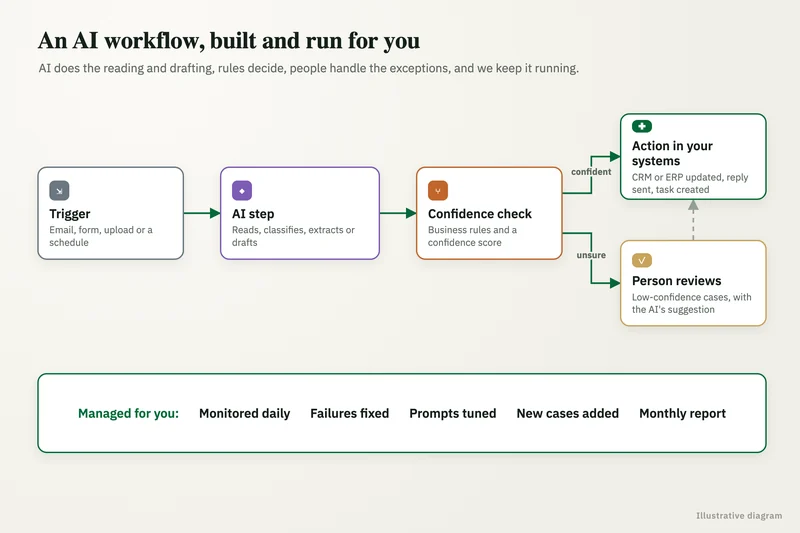
A good AI consultant for construction companies turns a vague goal ("we should be using AI") into a short, ranked list of workflows, a tool decision for each one and a way to measure the result. The work is advisory first. Building agents or integrations comes later, and only for the workflows that earn it on numbers.
In practice the engagement covers six pieces of work, and each should end in a document or decision you keep.
- Current-use audit: which estimators, PMs and office staff already paste specs, contracts or bid documents into ChatGPT, Claude, Gemini or Copilot, on which accounts and with what retention settings.
- Workflow ranking: scoring submittal review, RFI drafting, daily logs, bid leveling, takeoffs, change order pricing, pay applications, lien waiver and certificate of insurance tracking, and closeout packages by hours spent, error cost and data sensitivity.
- Stack review: what your project management platform, document tools and accounting ERP already offer, what you already pay for, and where the data actually lives (Procore, Autodesk Construction Cloud, Bluebeam, SharePoint, Sage 300 CRE, Viewpoint Vista, Foundation, CMiC, Primavera P6).
- Build or buy decision: vendor AI features, an off-the-shelf construction AI product, or a custom workflow connected to your systems, with running costs modeled per month.
- Rules and training: an AI policy for the field and office, a verification step for anything that goes to an owner, architect or subcontractor, and training on your own document types.
- Measurement: a baseline of hours per task before the pilot and the same measure after, so leadership decides with evidence instead of a demo.
Why construction needs a different kind of AI consulting
Construction work runs on documents that carry contractual weight, across many companies, on jobs that each behave like a temporary business. A generalist who treats a contractor like a software company will miss that a wrong answer in a submittal review or a change order is not a typo: it can become a claim, a delay or a payment dispute.
Adoption is moving fast, which raises the cost of getting it wrong. The Associated General Contractors of America and Sage reported in their 2026 Construction Hiring and Business Outlook, released January 8, 2026, that 61% of firms were using AI or planned to increase investment in it, up from 44% the year before. The same survey found 45% of firms use AI for office and administrative work, ahead of estimating and preconstruction. That matches what we see: the first wins are in the trailer and the back office, not on the jobsite.
The vendors are moving too. On July 23, 2026, Procore made its AI agents generally available in three Digital Coworker packages: a Starter Pack with five agents (Deep Search, Submittal Review, RFIs, Daily Logs and Contract Review), a Pro tier with 20 agents plus event triggers and scheduled automations, and an Enterprise tier with more than 25 agents, Agent Studio and a BI connection. If you run Procore, the first question for any consultant is whether those packages already cover your top workflows, and what they cost against the hours they save.
Which construction workflows should an AI consultant look at first?
Start where volume is high, a person checks the output anyway, and an error is caught before it leaves the company. Leave anything that makes a field decision on its own, prices work for an owner, or affects safety until the firm has a habit of verifying AI output.
The table below is how we rank common candidates. Risk depends on the use: drafting an RFI response for a PM to edit is low risk, sending it automatically is not.
| Workflow | Typical AI role | Systems involved | Risk | Good first pilot? |
|---|---|---|---|---|
| Submittal review against specs | Compare product data to the spec section and flag mismatches for the PM | Procore or ACC, spec book PDFs | Low to medium | Yes, with PM sign-off |
| RFI drafting and search | Find related RFIs, drawings and spec clauses; draft the question or response | Procore, ACC, Bluebeam | Low | Yes |
| Daily logs and site reports | Turn voice notes, photos and texts into a structured daily log | Procore, Buildertrend, mobile apps | Low | Yes |
| Lien waivers and certificates of insurance | Extract dates, limits and names; flag expired or missing items before pay | ERP, SharePoint or Google Drive | Low to medium | Yes |
| Pay application review | Check sub pay apps against the schedule of values and prior billing | Sage 300 CRE, Vista, Foundation, Textura | Medium | Often, with accounting review |
| Bid leveling | Normalize subcontractor bids into one comparison with scope gaps flagged | Excel, BuildingConnected, email | Medium | Often |
| Quantity takeoffs and estimating | Assist takeoffs from drawings and suggest unit costs | Estimating software, historical cost data | High | Only after simpler wins |
| Contract and subcontract review | Flag indemnity, pay-if-paid, retainage and notice clauses | Contract templates, document store | Medium to high | Yes, as a checklist for a person, never as approval |
| Schedule risk analysis | Spot activities likely to slip from logs and RFIs | Primavera P6, Microsoft Project | High | Later, once data is clean |
Procore AI, Autodesk AI or a custom build: how should you decide?
Use the vendor's AI first when the data already lives in that vendor's platform and the workflow is standard. Build custom when the work crosses systems (for example, a pay application that needs the ERP, the project platform and an insurance certificate folder), when you need your own rules applied, or when the vendor tier costs more than the problem.
Three checks settle most decisions. First, where does the data live: an agent inside Procore cannot see your Sage job cost detail unless someone connects it. Second, what does it cost per month at your project count and user count, compared with the hours it removes. Third, who owns the setup: prompts, rules and integrations you build in your own accounts stay with you if you change vendors.
A good consultant should be comfortable recommending the vendor feature and walking away from a build. If every recommendation ends in a custom project, you are talking to someone who sells builds, not advice.
| Situation | Usually best option | Why |
|---|---|---|
| Workflow lives entirely in Procore or ACC (RFIs, submittals, daily logs) | Vendor AI feature or package | Data and permissions are already there; least setup |
| Workflow crosses project platform, ERP and email (pay apps, compliance documents) | Custom workflow connected to each system | No single vendor sees all the data |
| Company-specific rules (your prequalification criteria, your bid leveling format) | Custom build or configured agent | Generic tools do not know your rules |
| Low volume, occasional task | General assistant on a business account | A build will not pay back |
| Field crews with poor connectivity | Mobile capture first, AI processing in the office | Reliability matters more than features |
A worked example: a 150-person commercial general contractor
Here is how we would structure an engagement for a hypothetical general contractor with about 150 staff, 25 active projects, Procore for project management and Sage 300 CRE for accounting. It illustrates the method; the numbers are assumptions you would replace with your own.
Weeks 1 and 2 are discovery. We interview PMs, project engineers, estimators and the AP team, check which AI accounts people already use, and pull time estimates for five candidate tasks. Suppose project engineers each spend about 5 hours a week logging and checking submittals, and the company has 12 project engineers: that is roughly 60 hours a week on one task, all of it reviewed by a PM anyway. Suppose AP also spends about 15 hours a week chasing lien waivers and expired insurance certificates before releasing sub payments.
Weeks 3 and 4 are decisions. We test Procore's submittal review agent against three past submittal packages and compare it with a custom check, read the data terms of each option, and model monthly cost. For lien waivers and certificates, which cross Procore, Sage and a shared drive, we design a small extraction workflow that flags missing or expired documents for an AP clerk to confirm. Leadership approves both pilots.
Weeks 5 to 10 are the pilot on four live projects. Project engineers use the approved tool, PMs spot-check a sample of flags against the spec, and we log time per submittal and every miss. If submittal time drops from 5 hours a week per engineer to 2, the firm has measured evidence for about 36 hours a week returned across 12 engineers, and can decide whether to extend it. If it does not, the firm has spent ten weeks, not a year of licenses, finding out.
The same structure works for RFIs, daily logs or bid leveling. What changes is the baseline task and who checks the output.
What should AI rules look like at a construction company?
Rules should be short enough that a superintendent will read them and specific enough that the office can follow them. One to two pages usually covers it, plus a list of approved tools.
The legal side is narrower than in finance or healthcare, but it is not empty. If you use AI to screen or rank job applicants, Colorado's SB 26-189, signed May 14, 2026 and effective January 1, 2027, is a notice-based law on automated decision-making in consequential decisions including employment, enforced by the Colorado Attorney General, under which people get an explanation of adverse outcomes, human review and data correction. Owner contracts and public-sector work may also limit where project data can be sent. This is not legal advice; have counsel review your policy and any AI clauses in owner or subcontract agreements.
- Approved tools and account types for office and field staff, and which project data may never go into a consumer account.
- A named person who signs off anything AI drafted before it goes to an owner, architect, engineer or subcontractor.
- No AI output used on its own for safety decisions, structural questions or final pricing.
- Logging of prompts and outputs on anything touching payments, contracts or claims, so you can reconstruct what happened in a dispute.
- A quarterly review of tools, costs and results, since vendor packages and terms change quickly.
Questions to ask an AI consultant for construction companies before you hire
The best test is whether the consultant asks about your documents, your systems and your margins before showing you a tool. Ask these in the first meeting and listen for specific answers.
- Which construction systems have you worked with, and how would you get data out of Procore or ACC and our ERP?
- Do you receive referral fees or commissions from any software you might recommend?
- How would you decide between Procore's or Autodesk's AI features and a custom build for our top workflow?
- What baseline will you measure before the pilot, and who on our side checks the output?
- What will it cost to run each month after you leave, per project or per user?
- What is the fixed price of the first phase, and what exactly do we receive at the end of it?
- Who owns the prompts, workflows and integrations you set up for us?
How much does an AI consultant for a construction company cost?
Construction AI consulting is usually priced as a short fixed-fee assessment, a fixed-fee pilot on one or two workflows, or a monthly advisory retainer. Published third-party rates vary widely by type of firm, and our AI consultant cost guide collects hourly and project figures in one table so you can sanity-check a proposal. If you want only the first step, our readiness assessment cost guide covers that phase.
Two costs are easy to miss. Software tiers with AI agents are often priced by package, project count or seats, and over a year they can exceed the consulting fee, so pilot on a few projects before upgrading company-wide. And PM and project engineer time spent testing has a real cost during busy season; a good plan keeps it to a few hours a week and avoids schedule crunches. We do not publish rates: after a free review we quote a fixed price per phase.
When a construction company should not hire an AI consultant
Not every contractor needs one, and a consultant who says otherwise is selling hours. Three situations usually do not justify outside help.
First, a small builder or specialty sub with one clear need, such as cleaner daily logs, can run a one-month trial of the AI feature in software it already pays for, then decide. Second, if your project management vendor's AI package already covers your top workflow and your data is all inside it, a sales demo, a short pilot and a one-page policy may be enough. Third, if job cost data, document naming and project folders are inconsistent from job to job, fix that first; AI will only make inconsistent records faster to misread.
You should bring in help when several departments are trying different tools on personal accounts, when you are about to buy a company-wide AI tier and nobody has measured the hours it saves on your jobs, or when the workflows that matter most cross your project platform, ERP and shared drives.
How Greenwolf Tech Labs works with construction companies
We work as AI strategy consultants for US companies, remotely and in US time zones. An engagement starts with a free review, then a fixed-price discovery phase that produces your ranked workflow list, a vendor-or-build decision for each, an AI policy and a pilot plan with a baseline. We built a compliance management tool for a regulatory consulting firm with recurring tasks, owners, due-date reminders and client-wise dashboards, described in our case studies, and the same discipline fits lien waiver, insurance certificate and closeout tracking: named owners, due dates and a person confirming anything that releases money.
You keep the accounts, prompts, workflows and data. If the plan calls for a build, such as a document check connected to Procore and your ERP, we can deliver it, but the first decision is always whether it is worth doing. Tell us which systems you run and where your teams lose the most hours, and we will tell you where we would start.
FAQ
Frequently asked questions
Do construction companies need an AI consultant?
Not always. A contractor with one clear task and software that already includes a suitable AI feature can trial it directly. An AI consultant for construction companies is most useful when several teams use different tools, when the key workflows cross the project platform and ERP, or before a company-wide AI upgrade is signed.
How is AI used in construction companies today?
Mostly in the office. The AGC and Sage 2026 outlook survey found office and administrative work is the most common use, ahead of estimating and preconstruction. Typical tasks are drafting RFIs, reviewing submittals, summarizing daily logs, leveling bids and tracking compliance documents.
Are Procore's AI agents enough, or do we need a custom build?
If the workflow lives entirely inside Procore, such as RFIs, submittals or daily logs, its Digital Coworker packages are worth testing first. If the work also needs your ERP, email or a shared drive, such as pay applications or insurance certificates, a custom workflow is usually needed because no single vendor sees all the data.
What is the best first AI project for a general contractor?
Pick a high-volume document task that a person already checks, such as submittal logging, RFI search or lien waiver tracking. These save measurable hours, and an error is caught before it reaches an owner or subcontractor. Estimating and schedule prediction usually come later, once data is cleaner.
Can AI do quantity takeoffs and estimates?
AI can assist takeoffs and suggest costs from historical data, but estimates carry margin and contract risk, so a person should own every number. Most contractors get better early returns from document and admin workflows, then move to estimating support once they trust their verification habits.
How long does an AI consulting engagement take for a contractor?
A discovery phase that produces a ranked workflow list and policy typically takes two to four weeks. A measured pilot on one or two workflows usually runs another four to eight weeks on live projects. Company-wide rollout depends on how many divisions and systems are involved.
Is it safe to put project documents into ChatGPT or Claude?
It depends on the account and the contract. Consumer accounts with default settings are the wrong place for owner contracts, bid numbers or drawings marked confidential. Business or enterprise tiers that do not train on your data and let you control retention are a different conversation, and some owner contracts restrict where project data may go.
Keep reading
Related pages
Get started
Tell us where AI should pay back
Describe the work that eats your team's time and the systems you run. We reply within one business day with the use cases we would test first, the risks to plan for and a fixed-price proposal.
- Free 30-minute AI review
- Fixed quote before any work starts
- Advice that is vendor-neutral, in plain English
Prefer email? info@aiconsultingservicesusa.com
Book a free AI review
Two lines is enough to start.